Online ordering for restaurants

Your own online ordering, no marketplace fees, ever

A branded ordering page and website, a kitchen tablet app, printers, promotions and loyalty. Apple Pay, Google Pay and card, paid straight into your own Stripe account. One flat subscription from £40 a month.

  • 14-day free trial, no card
  • Live in an afternoon
  • Built in Britain, hosted in the UK
A FoodEngine ordering page on a phone: hero photo, Delivery or Collection, postcode check and today's deals
The same store's photo-first menu with a category rail and a Most popular strip
0% marketplace feesApple Pay · Google Pay · cardKitchen app on Google PlayAny printer: Bluetooth · LAN · WiFiDeals, promo codes and loyaltyYour own domainUK hosted · GDPR tools
01 · The customer side

Nine taps from hungry to paid

Real captures of a FoodEngine store at phone size. No app to install, no account needed to pay, no redirects. Flick through the journey.

01 · The ordering page

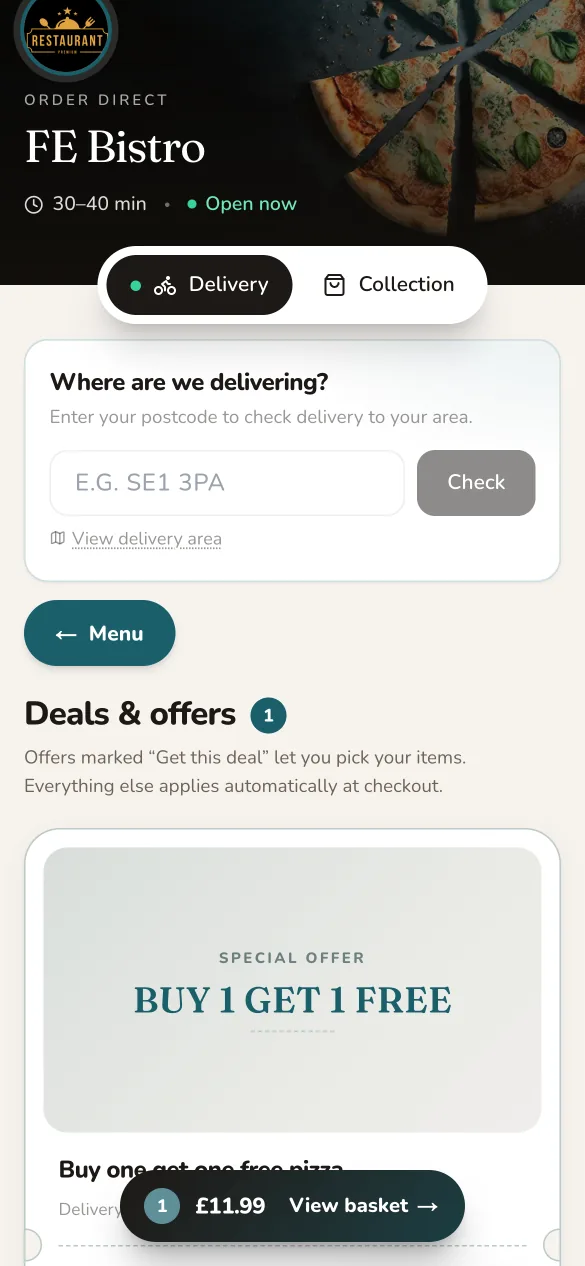
First screen, before a single scroll

Your hero photo and logo, Delivery or Collection, a postcode check that answers with the fee and the minimum, and today's deals. Your name on the URL: yourname.foodengine.uk, or your own domain.

Real pageDelivery + collectionPostcode checkYour domain
Ordering page top: hero, logo, Delivery or Collection toggle and postcode check
02 · The menu

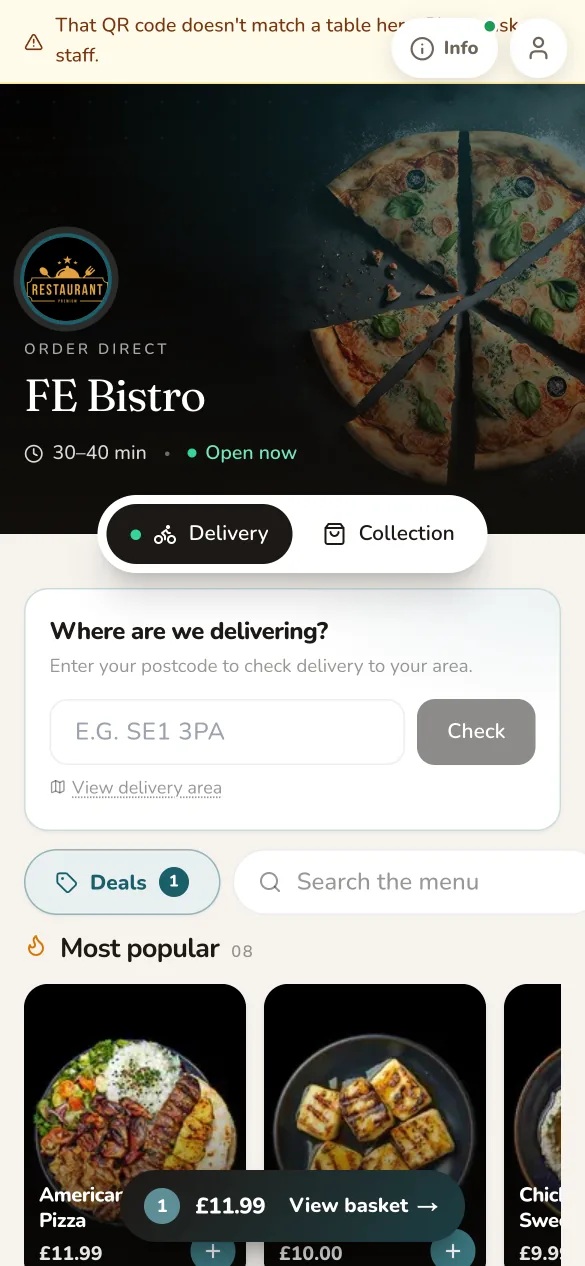
Photo-first, and it follows the scroll

A category rail that stays with the customer, a Most popular strip, search across the whole menu, and every item one tap from its options. Sold out? Switch it off from your phone and it greys out here, marked Sold out.

Real pageCategory railSearchMost popular
Menu with a sticky category rail, Most popular strip and photo cards
03 · Customise

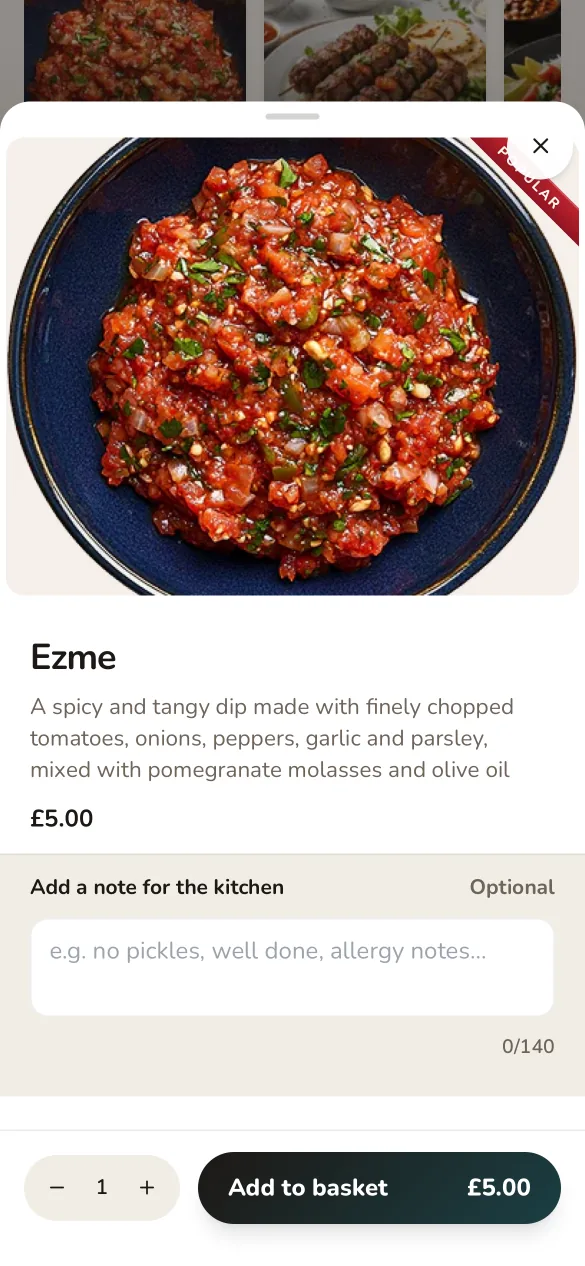
Sizes, choices and add-ons, priced right

Mandatory single picks, optional multi-picks with limits, extras with their own prices, a note to the kitchen and a quantity. The rules you set in the menu builder are enforced here, so the ticket is never ambiguous.

Real pageVariantsModifiersKitchen note
Item sheet with description, sizes, extras, a kitchen note and Add to basket
04 · Basket

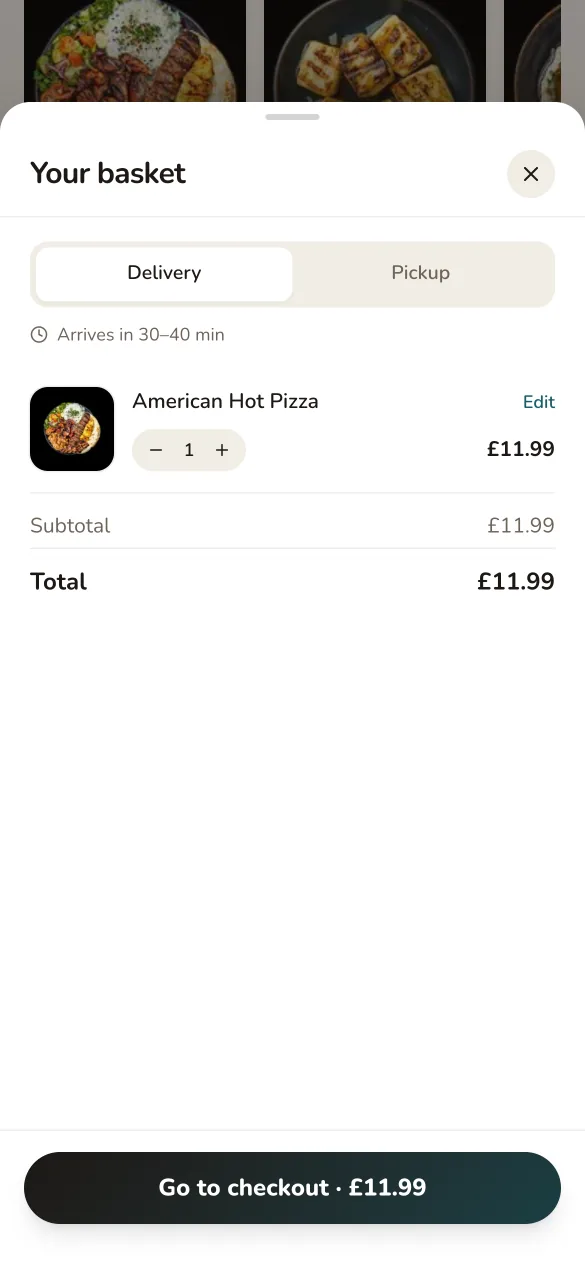
A total that is right before checkout

Delivery or pickup, arrival time, quantity steppers. The zone fee, the minimum order and the best deal are all applied here, and the basket tells the customer how far they are from free delivery.

Real pageZone feeMin orderBest deal auto-applied
Basket with delivery or pickup toggle, arrival time and quantity steppers
05 · Pay

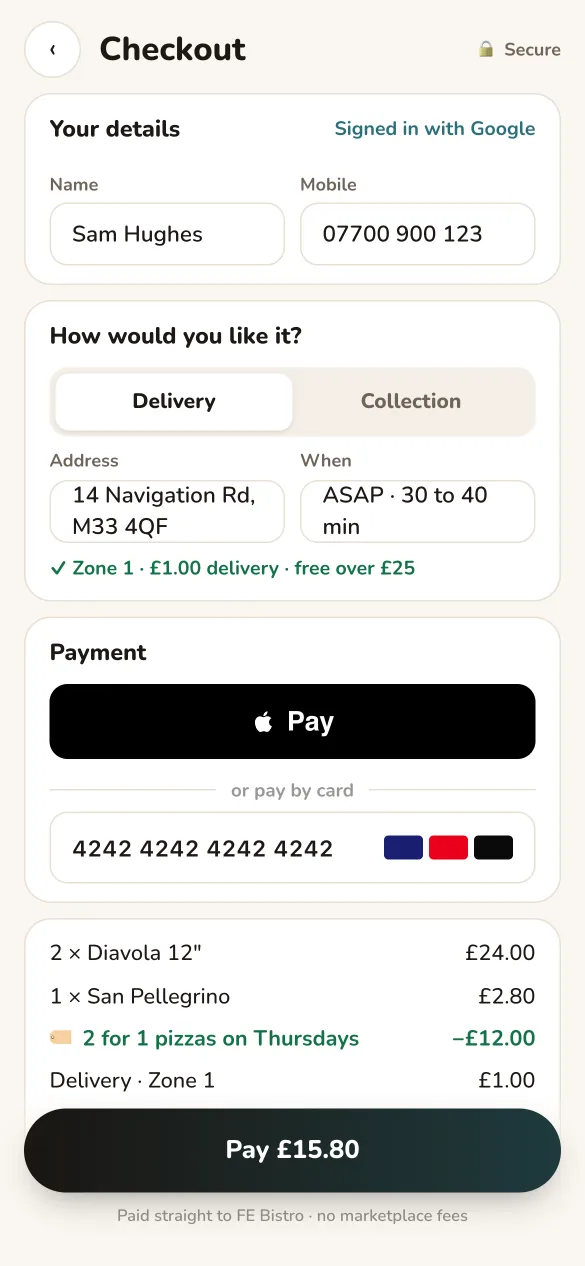
Apple Pay, Google Pay or card, one screen

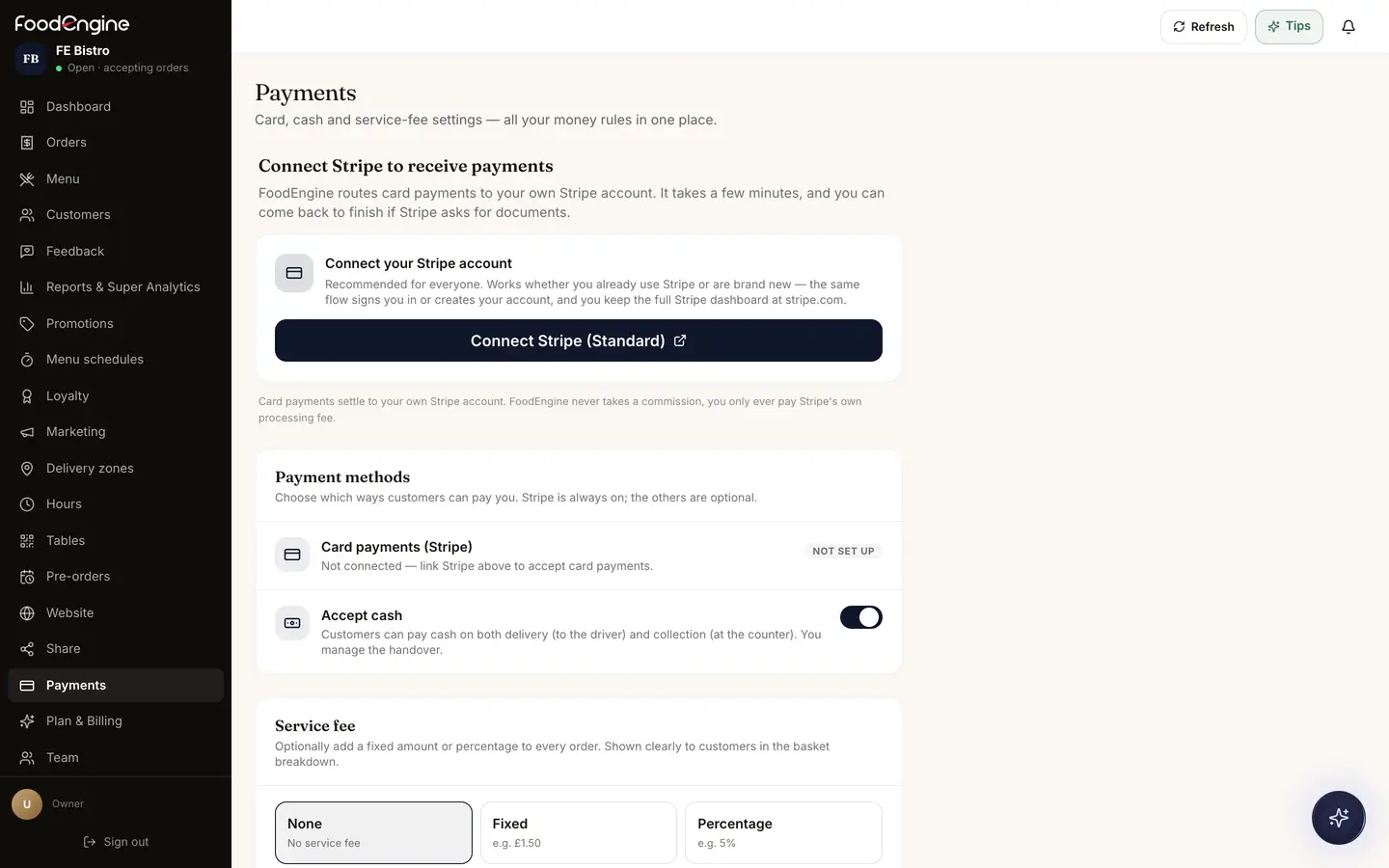
No account needed, no redirect to a third-party page. Money lands in your own Stripe account, with Stripe's standard fee (1.5% + 20p for UK cards) and nothing on top from us. Cash and pay-at-restaurant are options too.

Rebuilt screenApple PayGoogle PayStripe Connect
Checkout with Apple Pay and card, the deal already applied
06 · Track

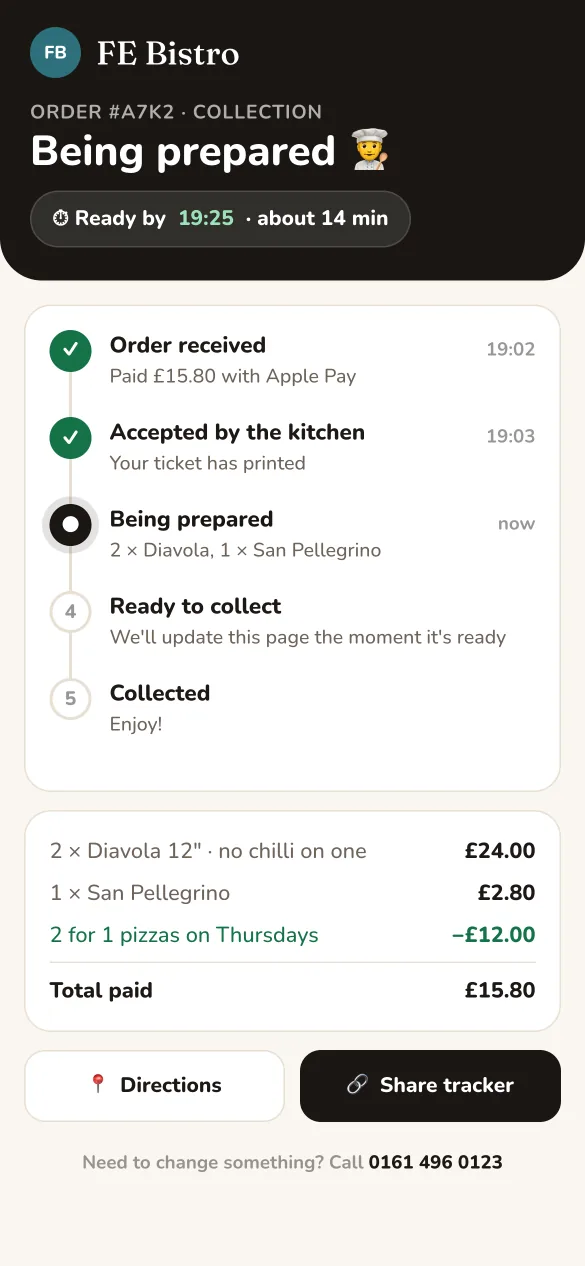
The page they keep open

Received, accepted, preparing, ready. The prep time you set on the tablet becomes the promise on their screen, and the confirmation email carries the same numbers. Fewer "where is my order" calls.

Rebuilt screenLive statusETAEmail updates
Live order tracker showing received, accepted, preparing and ready steps
07 · Deals

Every live promotion, one sheet

Percentage and pound discounts, buy-one-get-one, bundles, a free item over a threshold, free delivery, first-order offers, payment-method discounts. The basket applies the best one by itself; promo codes still work for the ones you keep private.

Real page13 deal typesPromo codesAuto-applied
Deals sheet listing every active promotion
08 · Dine-in

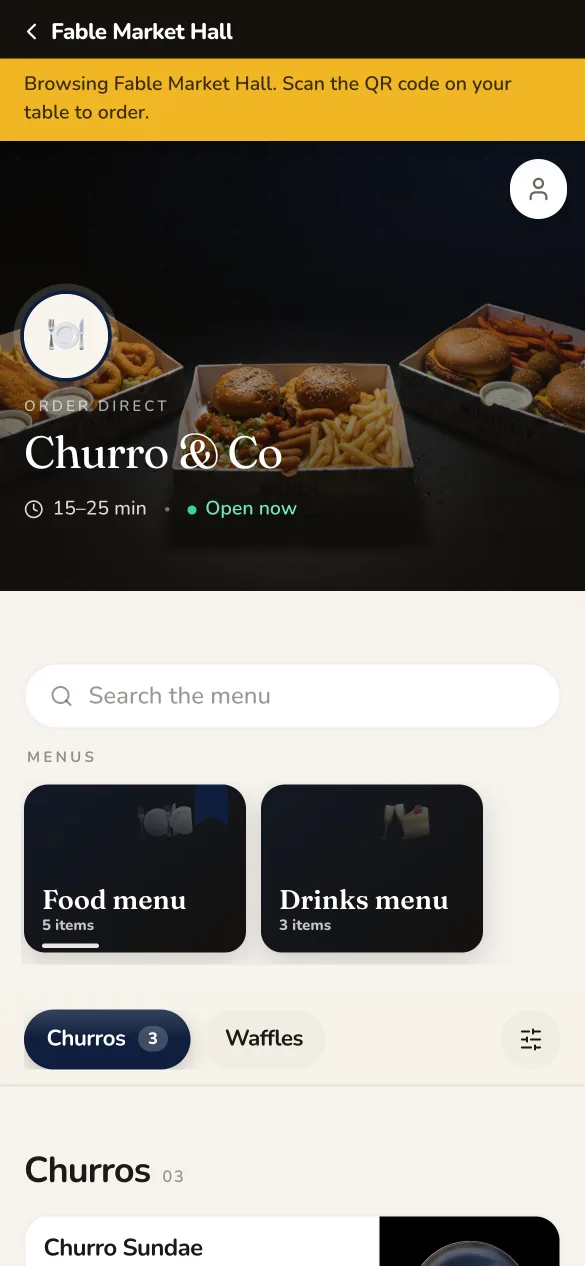
Scan at table 4, order and pay from the seat

One QR per table, printed from the dashboard as PNG or SVG. The guest browses, orders and pays; the table number lands on the kitchen ticket. Works for counters, order-ahead and multi-kitchen food halls too.

Real pageTable QRPay at tableFood halls
Dine-in ordering page opened from a table QR code
09 · Come back

The second order takes ten seconds

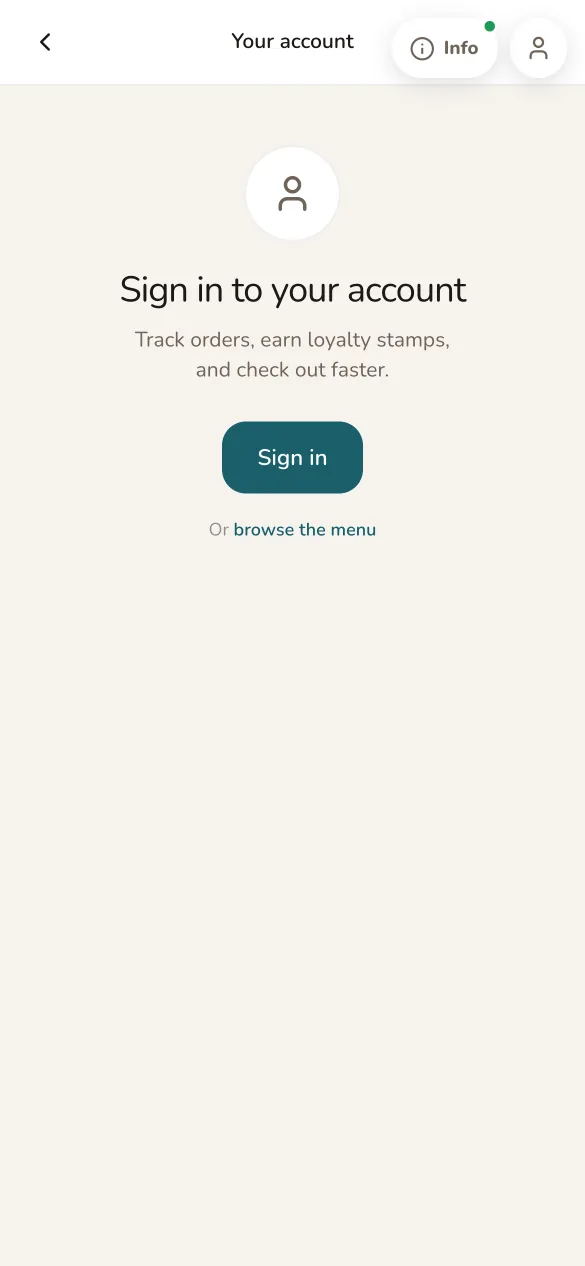
Google sign-in, order history and one-tap reorder. Loyalty stamps, points and vouchers live here too, redeemed at checkout with a guard against double spending. Your customers, your data, exportable any time.

Real pageGoogle sign-inOrder historyLoyalty
Customer account page with sign-in and order history
02 · On a bigger screen

The same store on a laptop

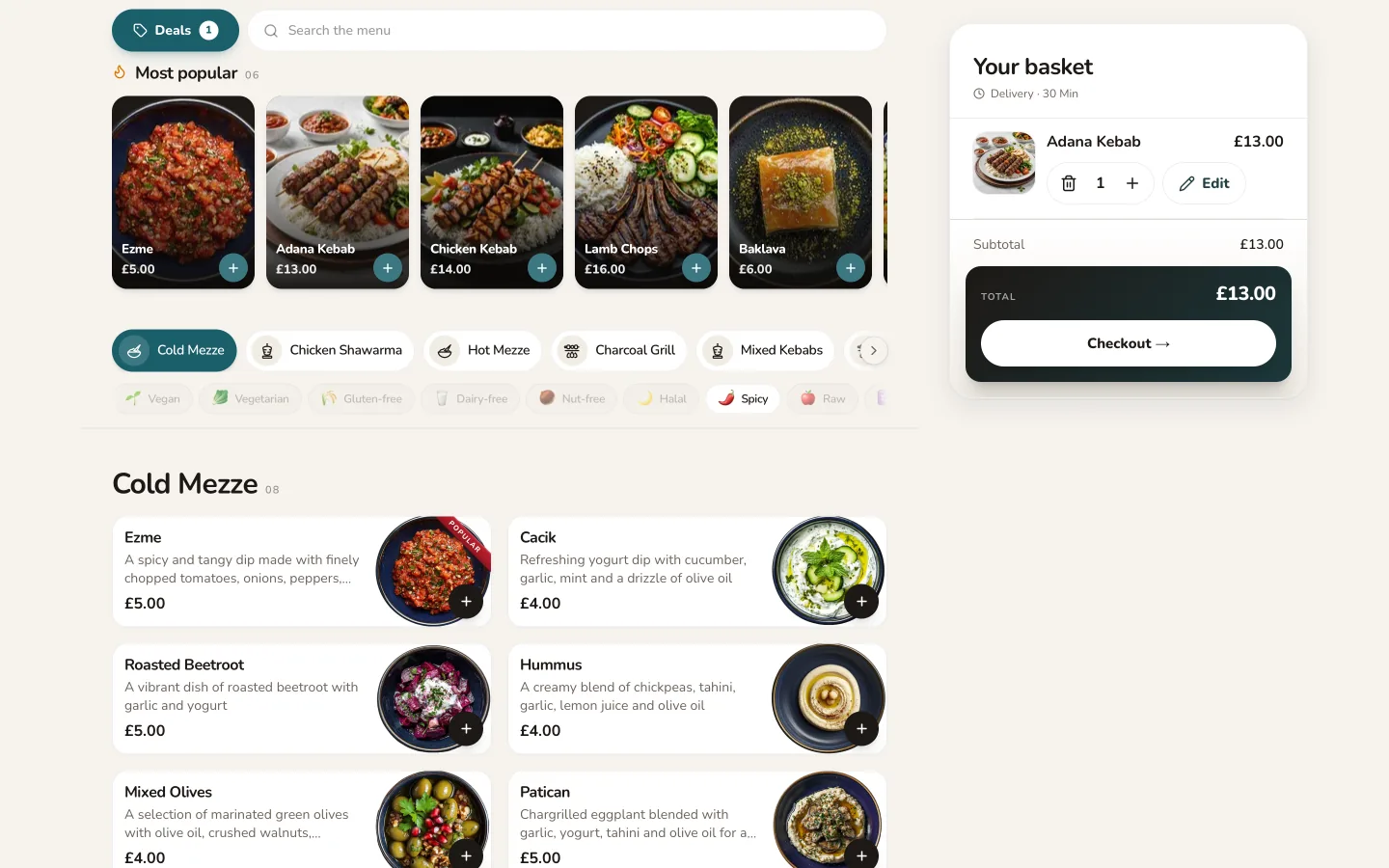
Menu on the left, a persistent basket on the right, checkout in place. Some orders come from a sofa, some from a desk at 11:58. Both get the same store.

  • Responsive down to the smallest phone, up to a wall-mounted screen
  • The item modal, the deals sheet and the basket are the same components everywhere
  • Your ordering page is a normal web page: it ranks, it shares, it embeds
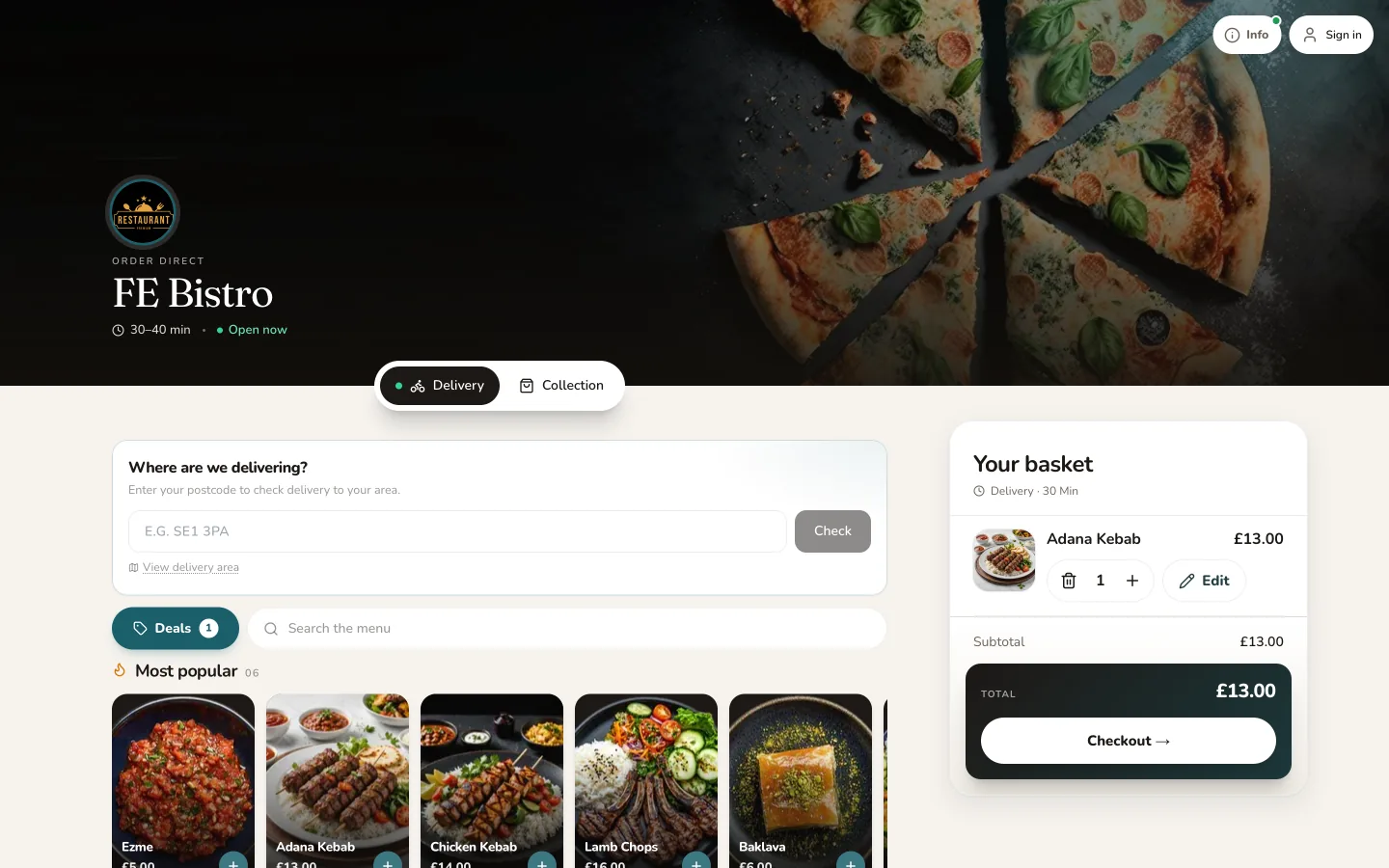
order.foodengine.uk/fe-bistro/order
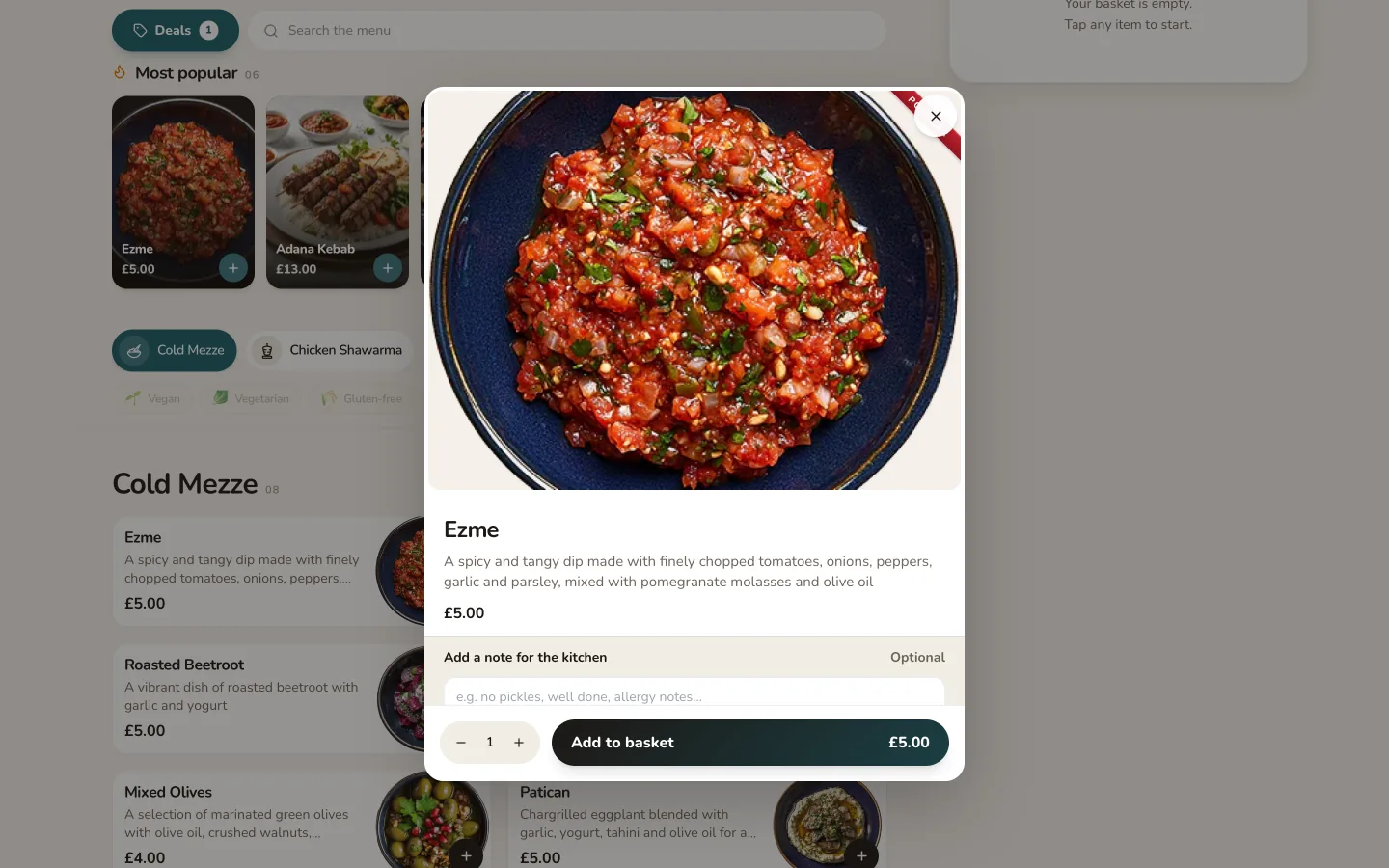
Ordering page on desktop with the menu on the left and the basket on the rightDesktop menu with photo cardsItem modal centred over the menu on desktop
Ordering page
03 · The owner side

One dashboard runs the whole restaurant

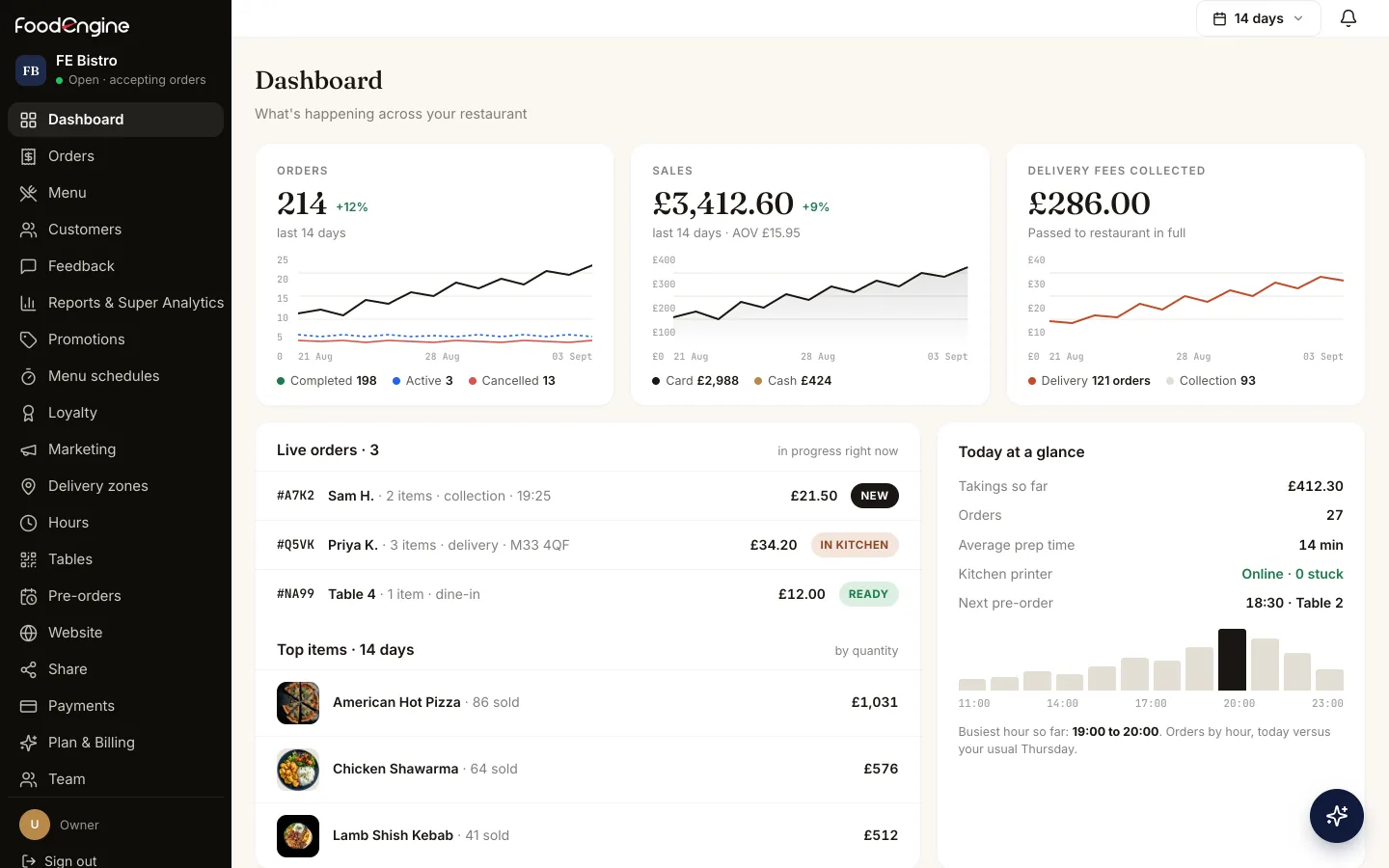
Orders, menu, deals, zones, reports, your website, even the kitchen printer. Rebuilt here with the numbers of a busy Thursday; every element exists in the product.

dashboard.foodengine.uk
Dashboard overview: orders, sales, delivery fees passed on, live orders and the week in bars
Overview

The whole day on one screen

Orders, sales and delivery fees passed on in full, the live queue, this week against last, and the getting-started checklist until you no longer need it. Installs to your phone's home screen with push alerts for every order.

dashboard.foodengine.uk/orders
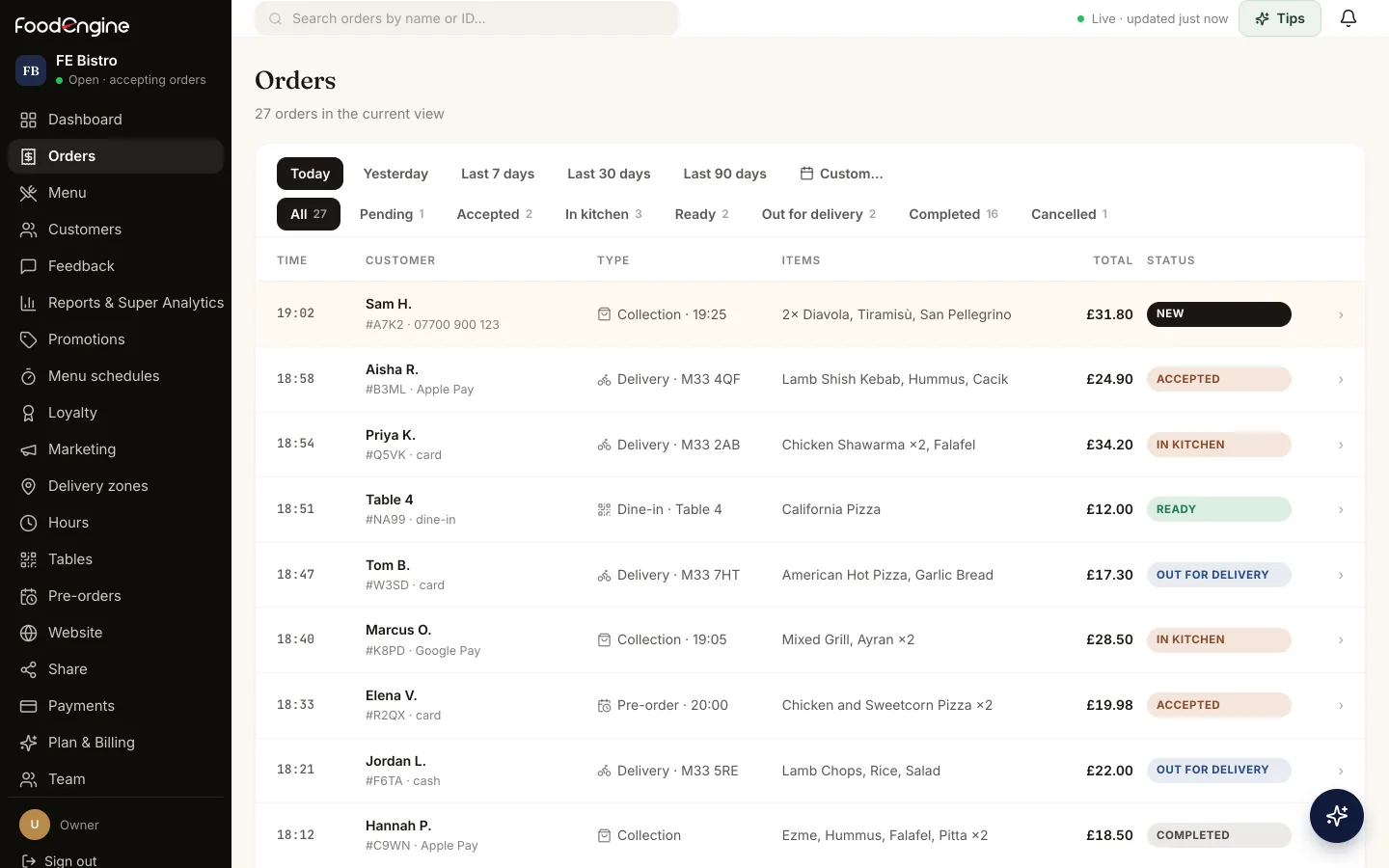
Orders board with type, items, payment and status for each order
Orders

Orders land, you tap accept

Every order with its type, items, payment and status. Accept with a prep time, print again, refund in full or in part. Auto-accept if you would rather the ticket just prints. A "do not prepare" guard if a card ever fails.

dashboard.foodengine.uk/menu
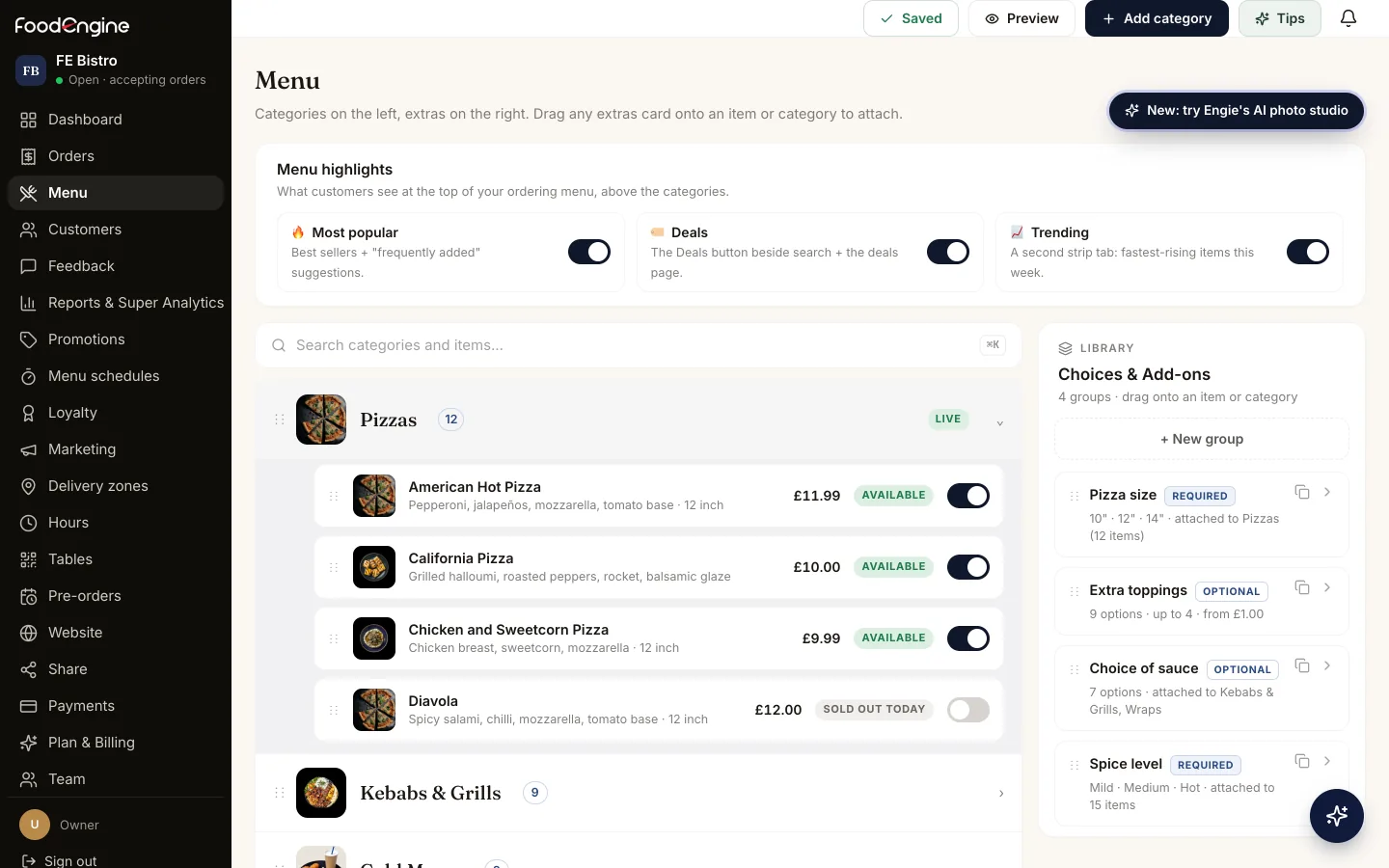
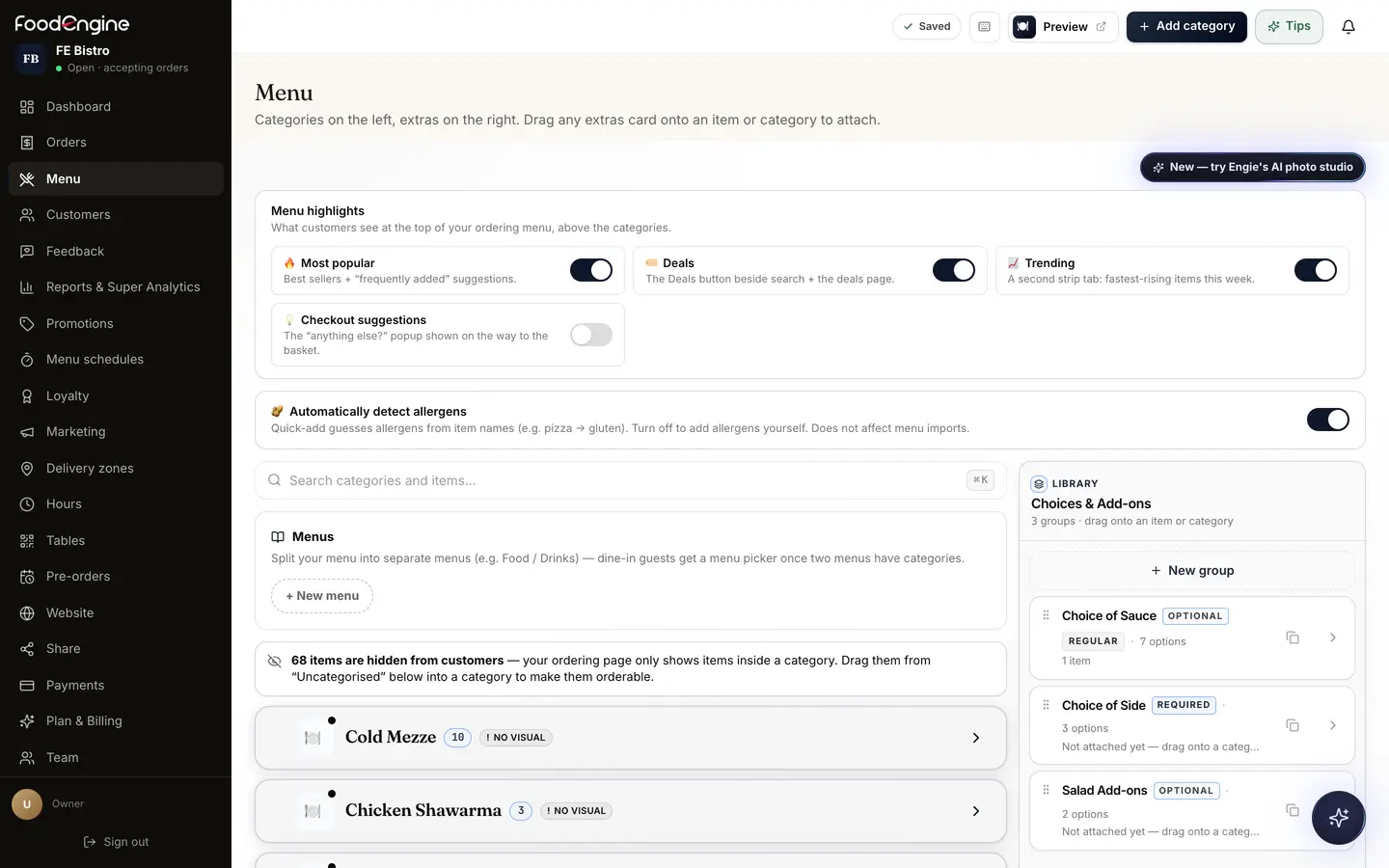
Menu builder with categories, photos, sizes and extras
Menu builder

A menu you will actually enjoy editing

Categories, items, sizes, choices and add-ons you drag into order. Reusable option groups attach across whole categories. Allergen and dietary tags. No photo? The AI photo studio shoots one from the name and description.

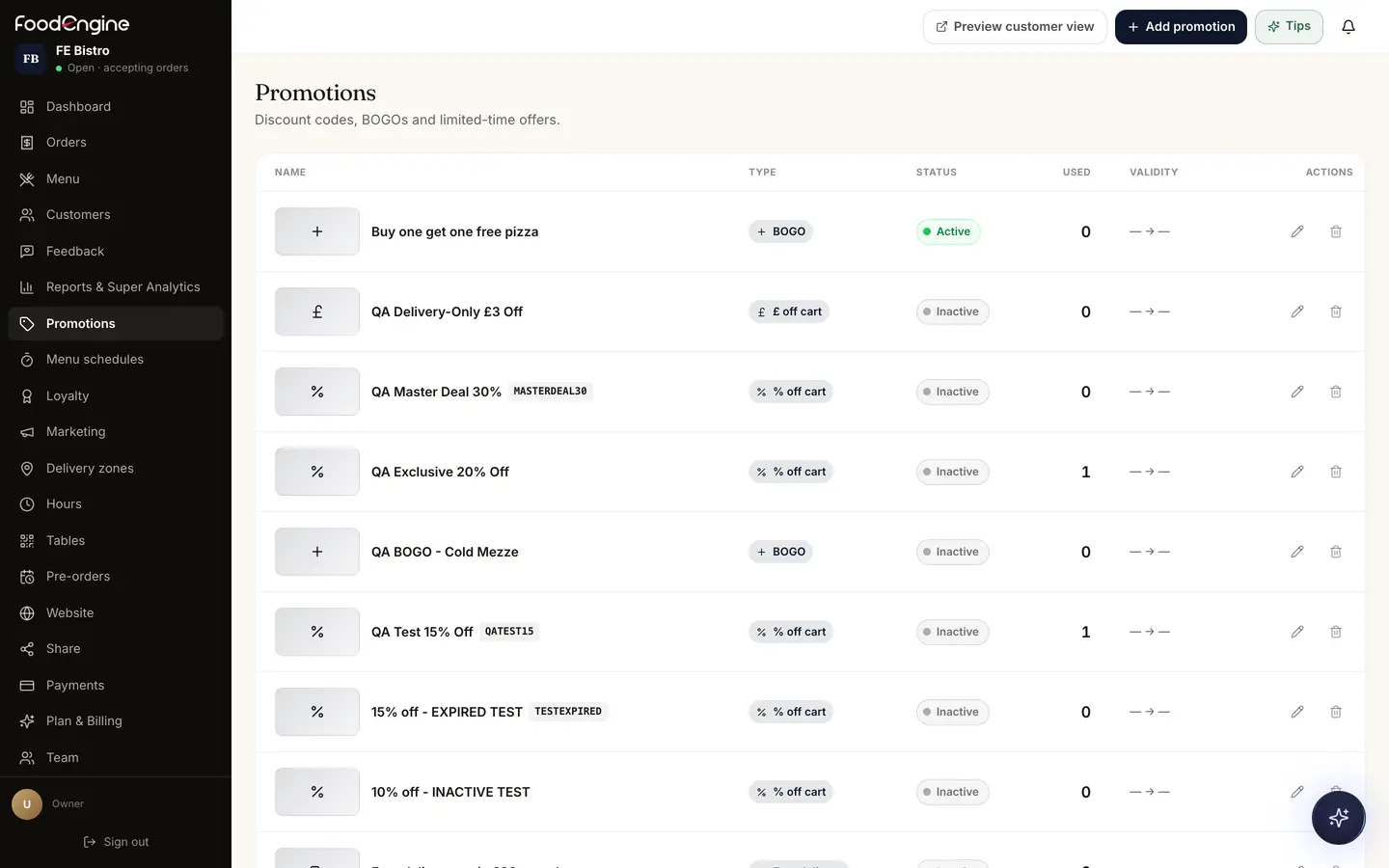
dashboard.foodengine.uk/promotions
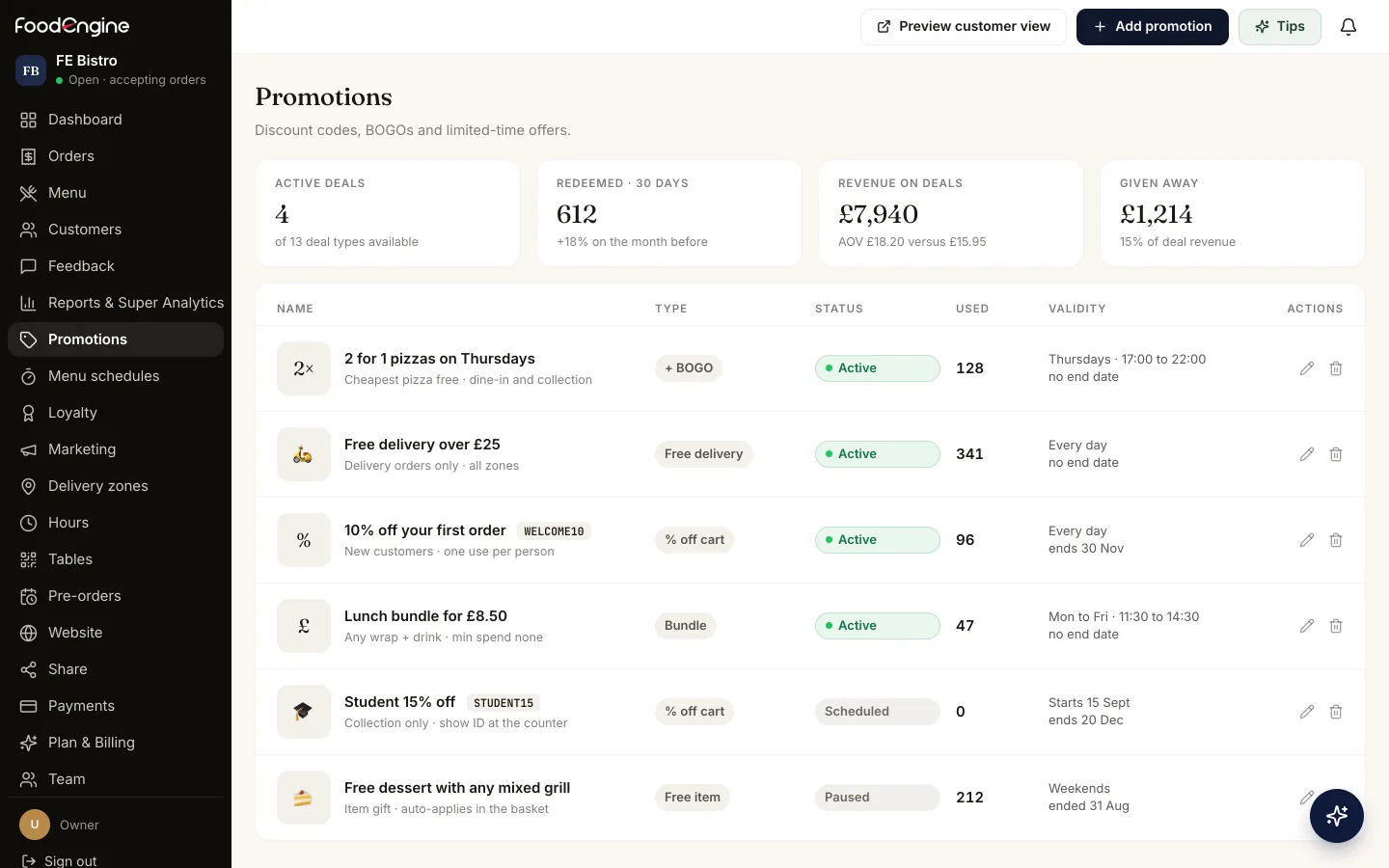
Promotions list with usage and revenue per deal
Promotions

Deals that pay for themselves

Thirteen deal types plus promo codes, each with how often it was used and what it brought in. Schedule them, stack rules, limit them to a zone or a payment method. Every discount is recomputed on the server before the card is charged.

dashboard.foodengine.uk/reports
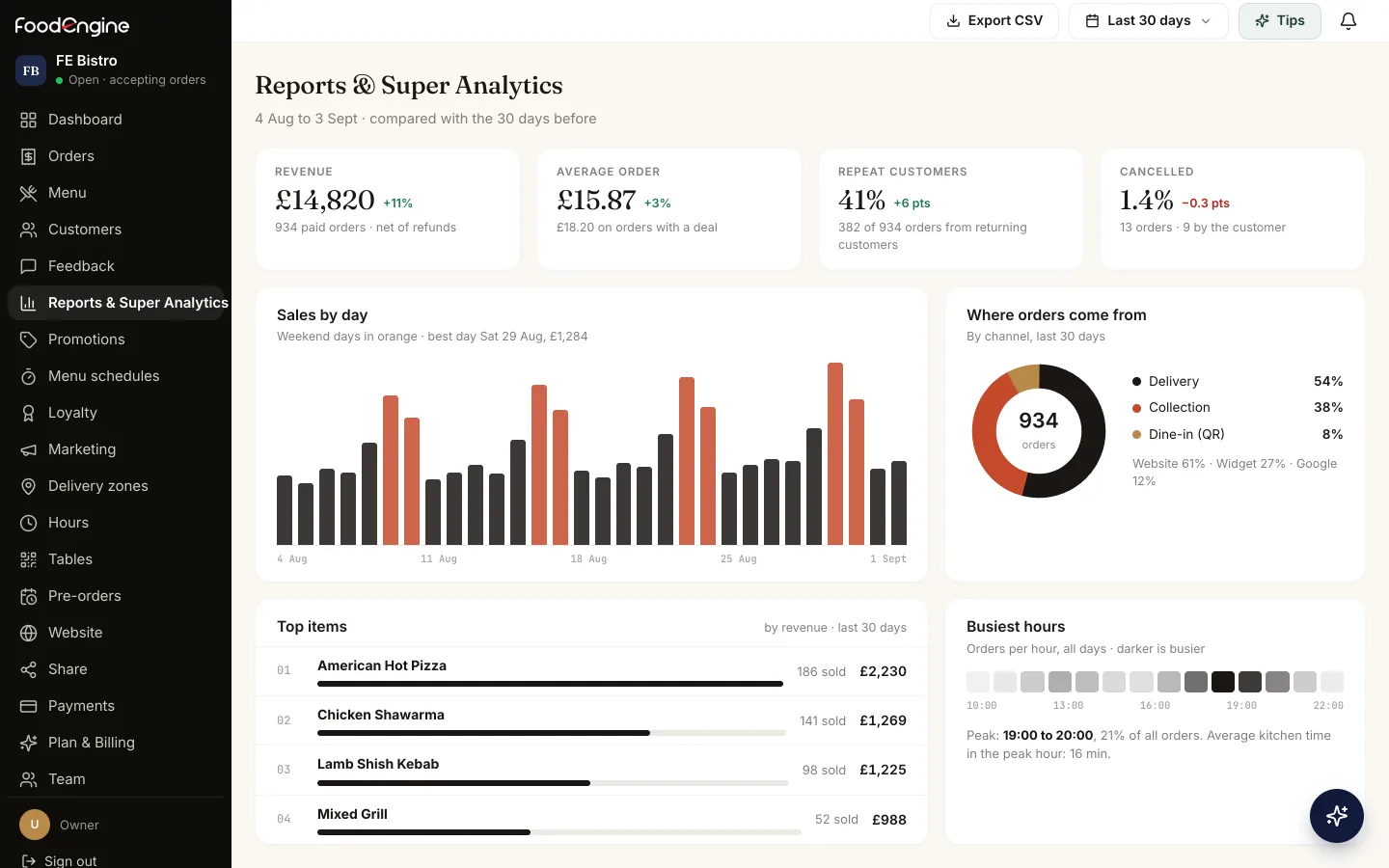
Reports: sales by day, channels, top items and busiest hours
Reports

Know your numbers, no spreadsheet

Sales by day, channel mix, top items, busiest hours, any date range, CSV export. An end-of-day money pack lands on the tablet and in your inbox with the figures your accountant asks for.

dashboard.foodengine.uk/zones
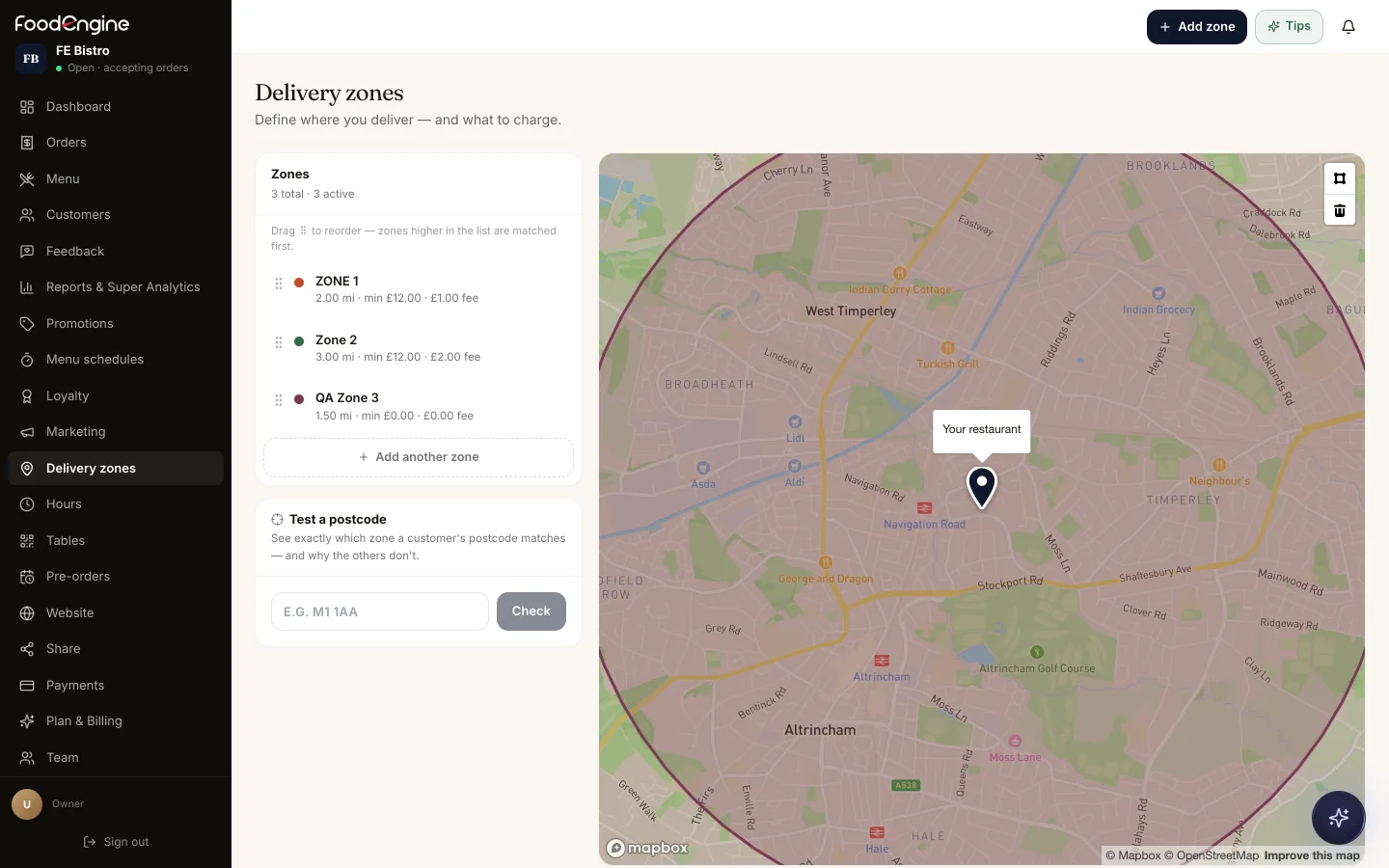
Delivery zones drawn on a real map with a fee and a minimum per zone
Delivery zones

Three kinds of zone on a real map

Rings by distance, drawn areas, postcode lists. A fee and a minimum order per zone, tested against any postcode before you go live. The customer sees the answer on the first screen. This is a real capture.

dashboard.foodengine.uk
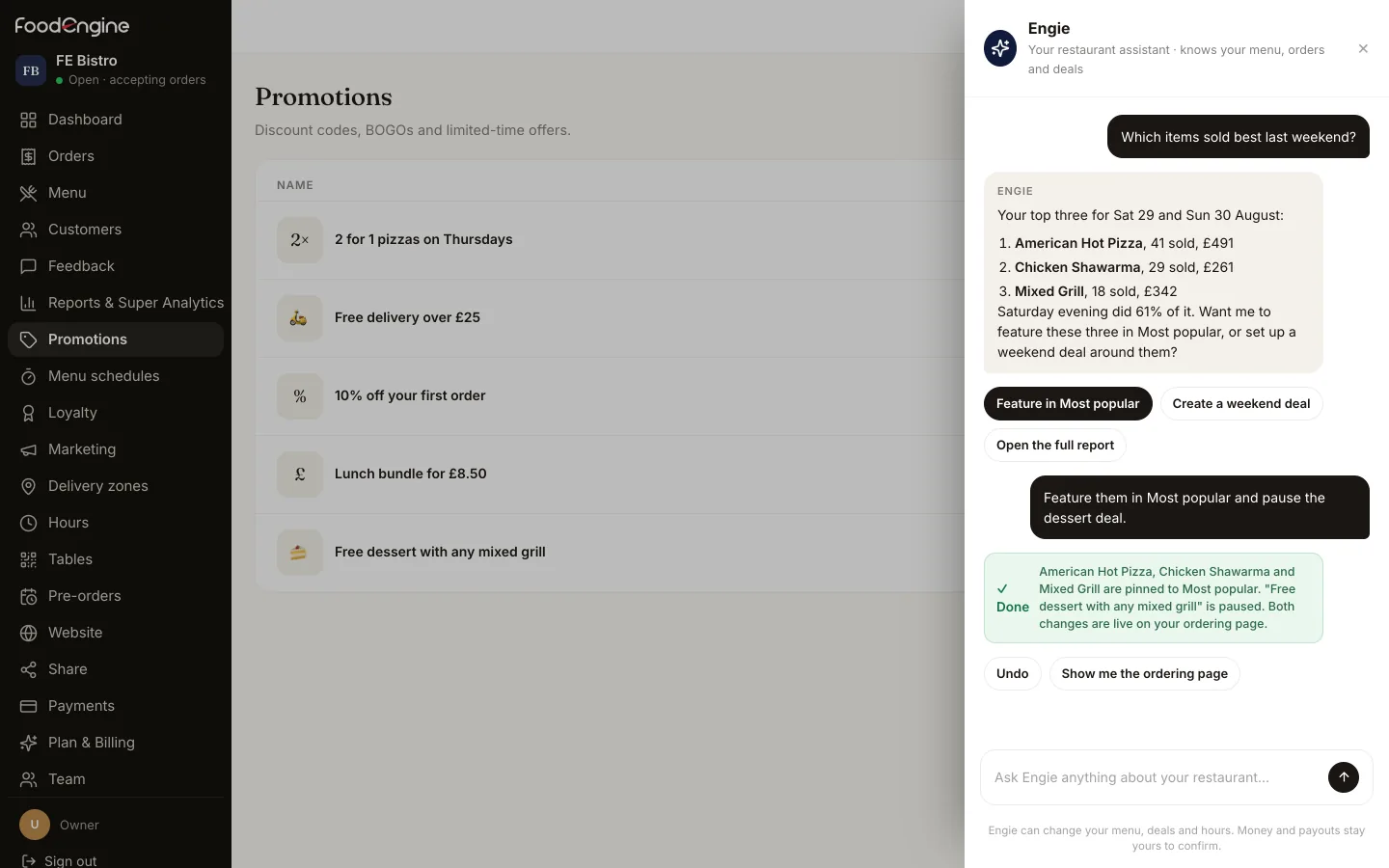
Engie, the AI assistant, answering from the restaurant's own numbers inside the dashboard
Engie AI

Ask in plain English, confirm, done

"Pause delivery for 30 minutes." "Mark the lamb kofta sold out." "What sold best on Saturday?" Engie answers from your own data, proposes the change and applies it when you confirm. On your phone, at the wholesaler, in the queue.

From a pocket

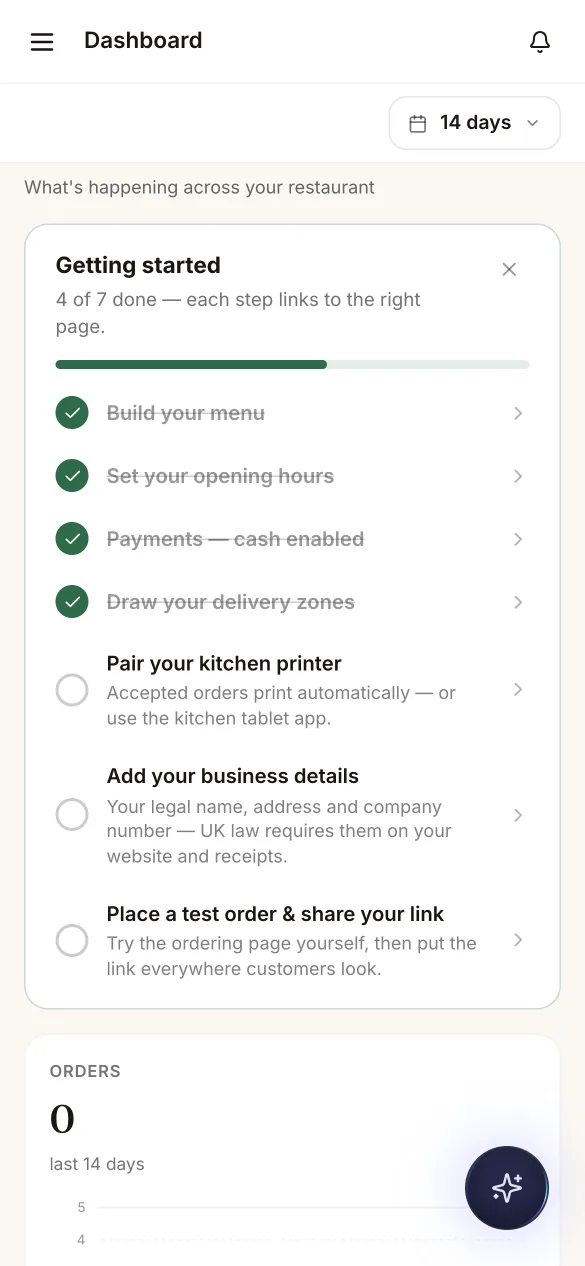
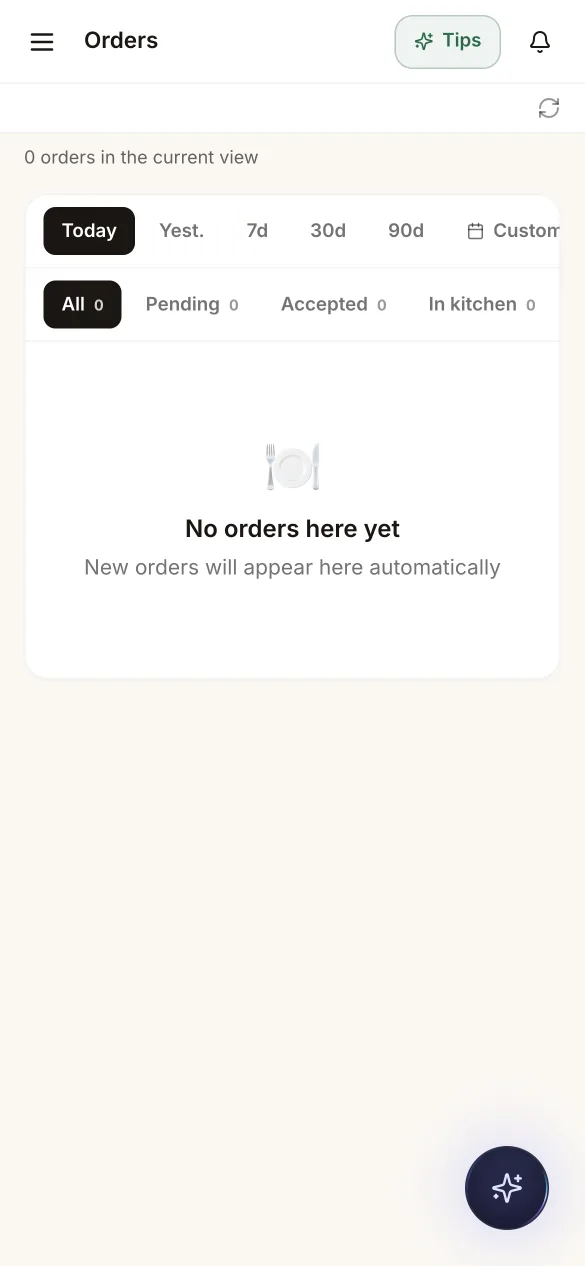
The dashboard is a phone app too

Real captures at iPhone size. Everything the desktop can do, one thumb. Add it to the home screen and orders buzz your phone.

Dashboard overview on a phone
Orders on a phone
04 · The kitchen

Bring your own tablet, bring your own printer

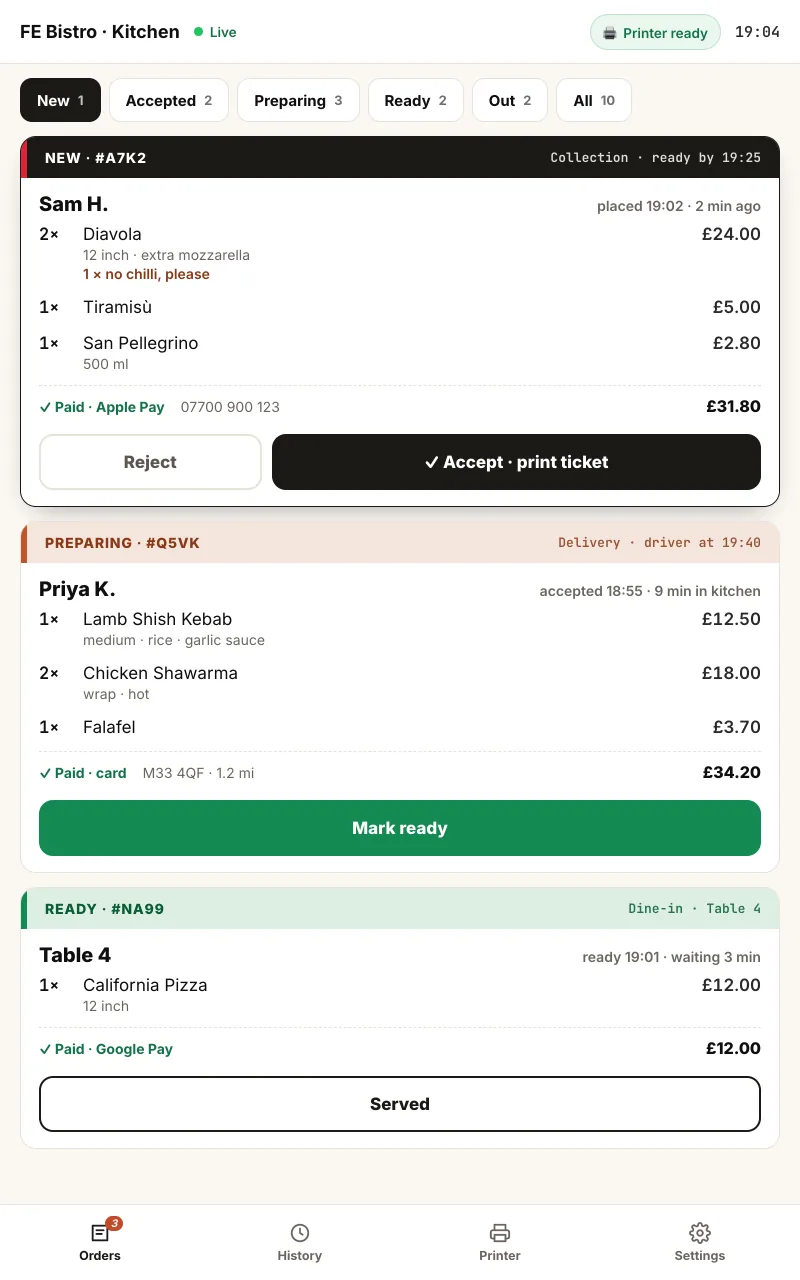
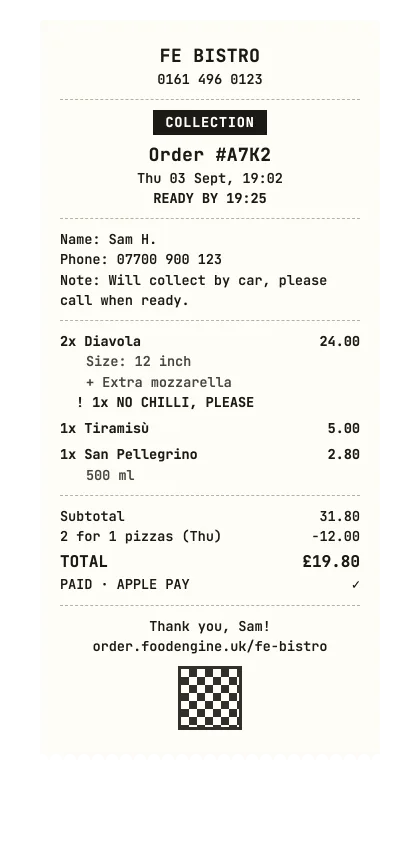
The FoodEngine Kitchen app runs on any Android tablet or phone. New orders ring loudly, even with the screen asleep. One tap accepts, sets the prep time and prints the ticket.

The kitchen tablet board with new, preparing and ready orders
An 80 mm kitchen ticket with banners, inverted order type, notes and a QR code
Tablet · ticket · printer

Accepted on the tablet, printed before you look up

Colours for new, preparing and ready. Busy mode pauses a service in one tap. An offline watchdog nudges the tablet and your phone if it goes dark while you are open.

  • Bluetooth to the tablet, the primary path in our kitchens today
  • LAN on port 9100, or WiFi, for printers on your network
  • Any 80 mm ESC/POS printer on your network or paired over Bluetooth. Star printers need ESC/POS mode; USB-only printers are not supported. Tested on the GoodCom all-in-one our live restaurants use
  • Prefer one device? We supply the GoodCom all-in-one, a kitchen tablet with the printer built in, for £200 including VAT. It is optional: your own tablet and printer work too
  • Drinks to the bar printer, food to the kitchen printer (up to 2 printers on every plan, more on Growth)
FoodEngine Kitchen app icon
FoodEngine Kitchen for AndroidFree on Google Play · Android 8 and newer · portrait, made for 10-inch tablets
Get it on Google Play

iPhone or iPad in the kitchen? The web version works in Safari for the order board; printing and the loud alarm need the Android app.

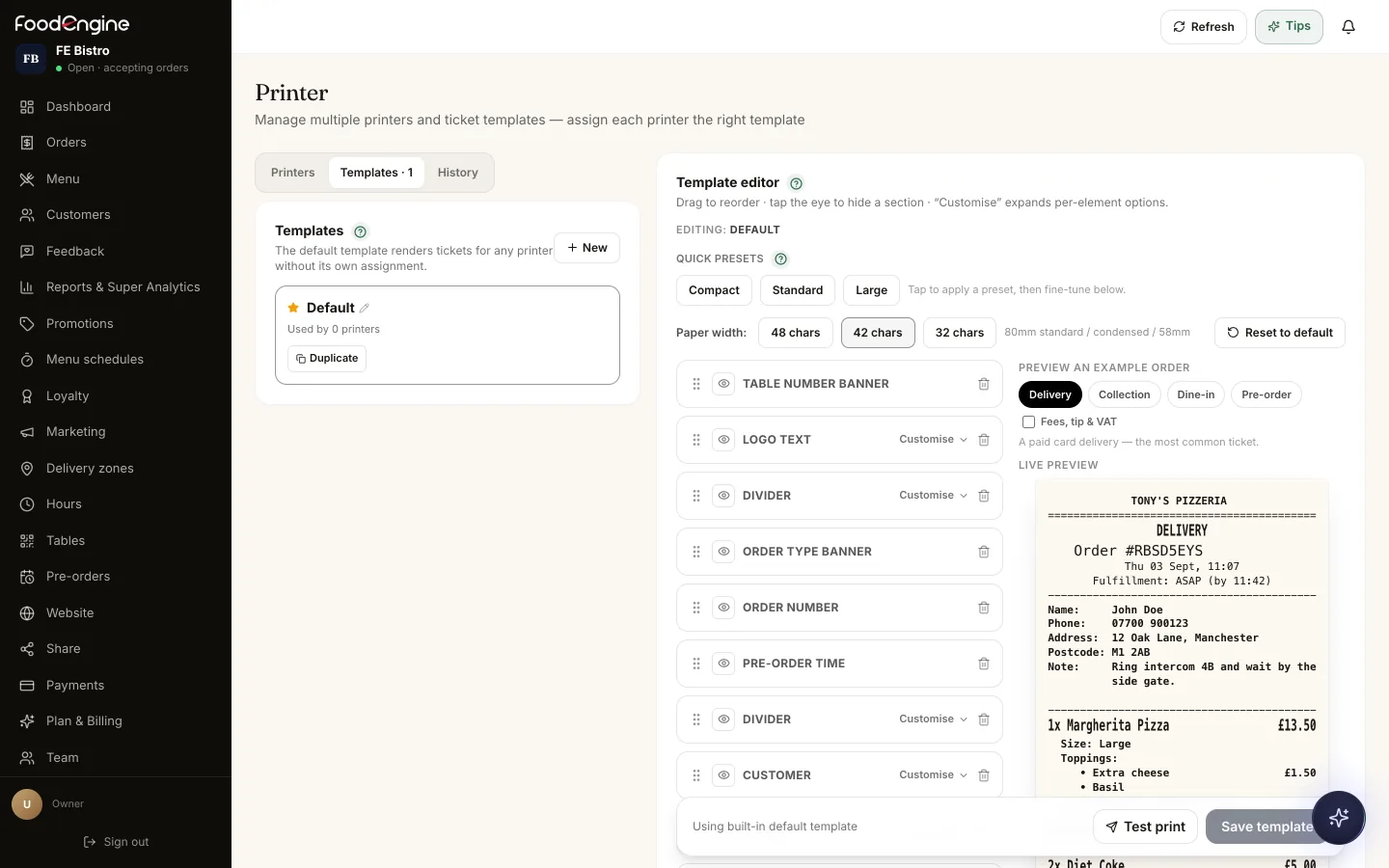
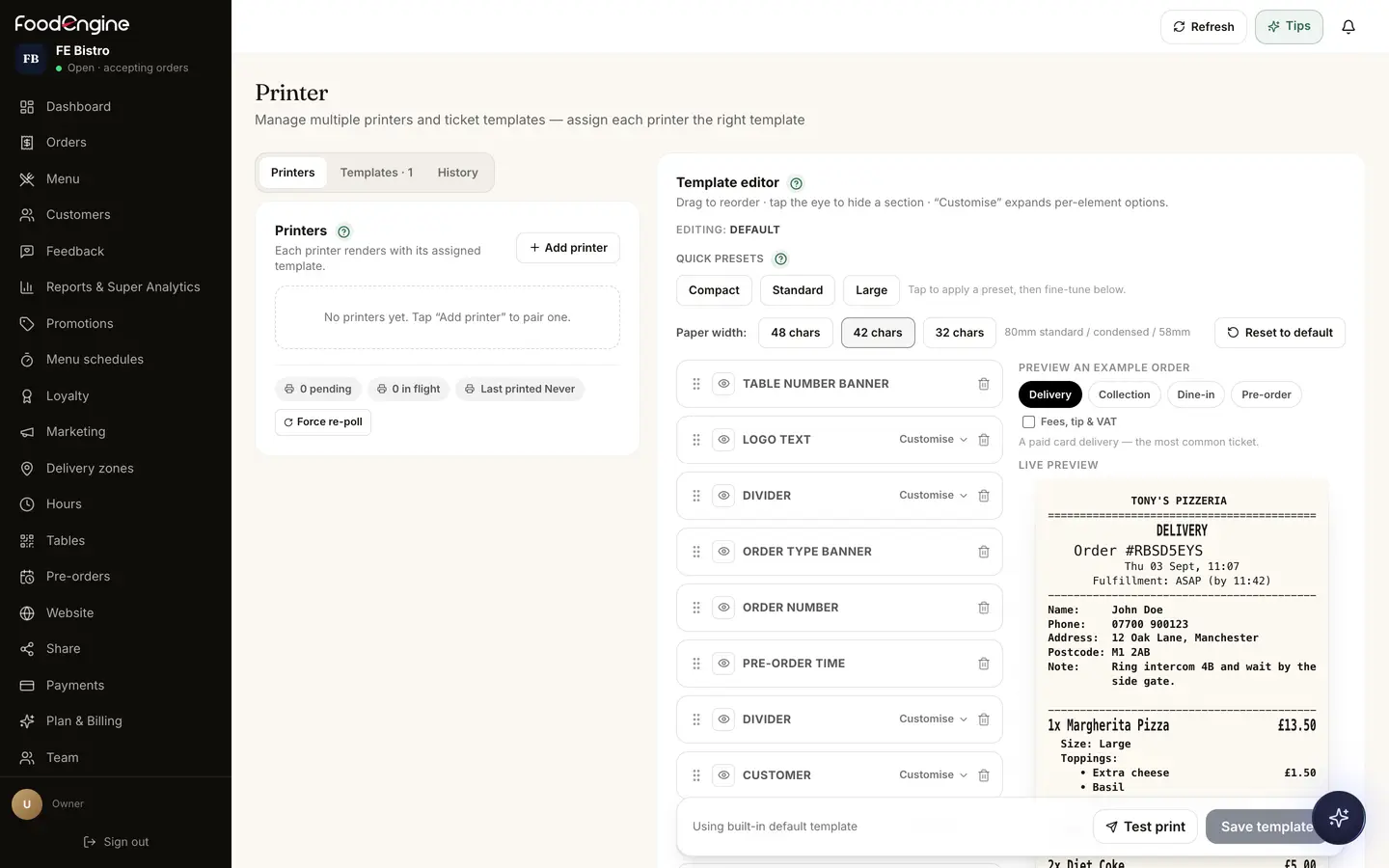
Ticket template editor

Yours to lay out

Drag sections, hide what you never read, flag notes with an exclamation mark, invert the order type so it reads from across the pass, add your QR. Live thermal preview as you edit. This is a real capture.

Real pageDrag sectionsLive previewPer-printer templates
dashboard.foodengine.uk/printer
The ticket template editor with a live thermal preview
05 · Your website

Your website, actually yours

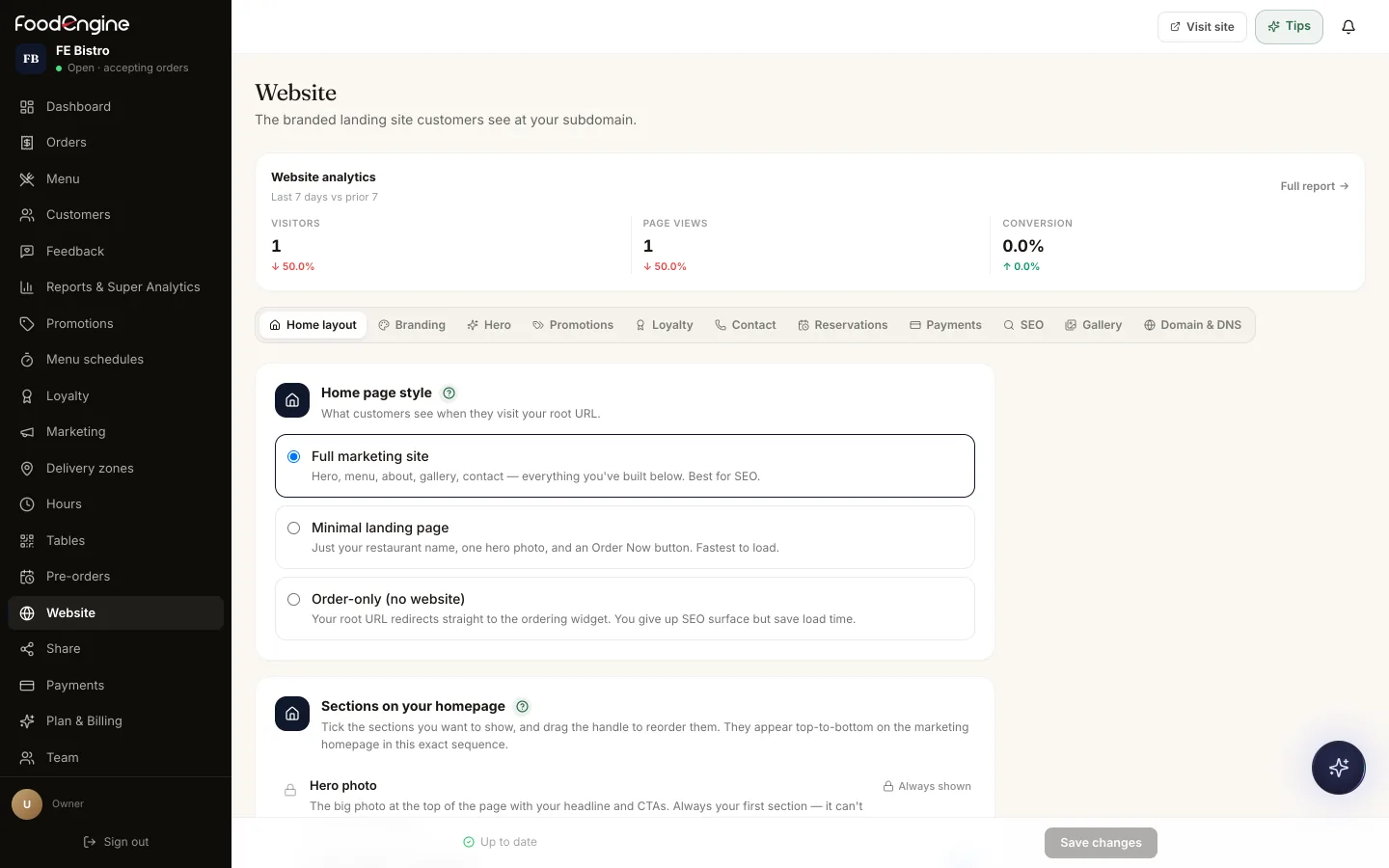
A full CMS in the dashboard: ten sections, twenty palettes, eight font pairings, your own domain with free SSL, and restaurant rich-result schema so Google shows the right thing

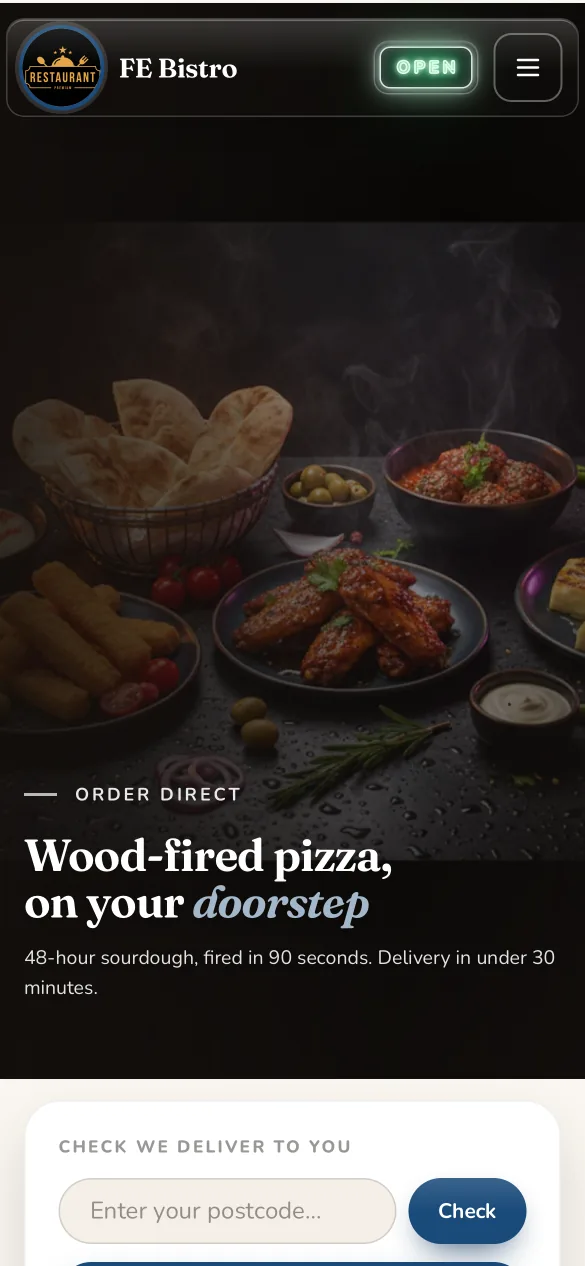
Homepage

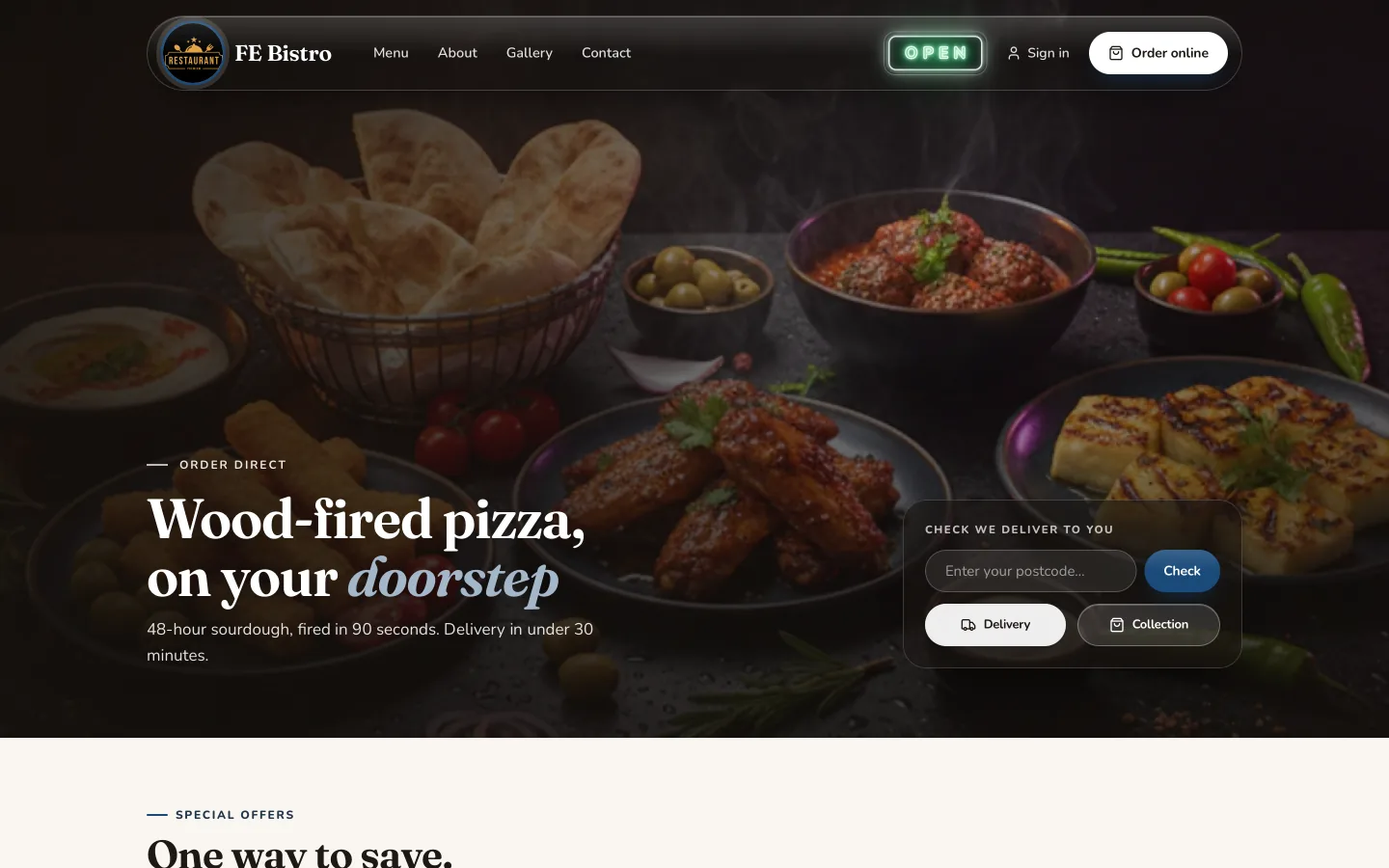
Hero, offers, menu, hours, map, reviews

Built from the Website tab in your dashboard. Your photo, your headline, your call to action, and an order button that goes to your own store, not a marketplace. Switch on a reservations page, or embed the booking tool you already use.

Real site10 sectionsYour domainFree SSL
fe-bistro.foodengine.uk
A restaurant website built with the FoodEngine CMS
Menu page

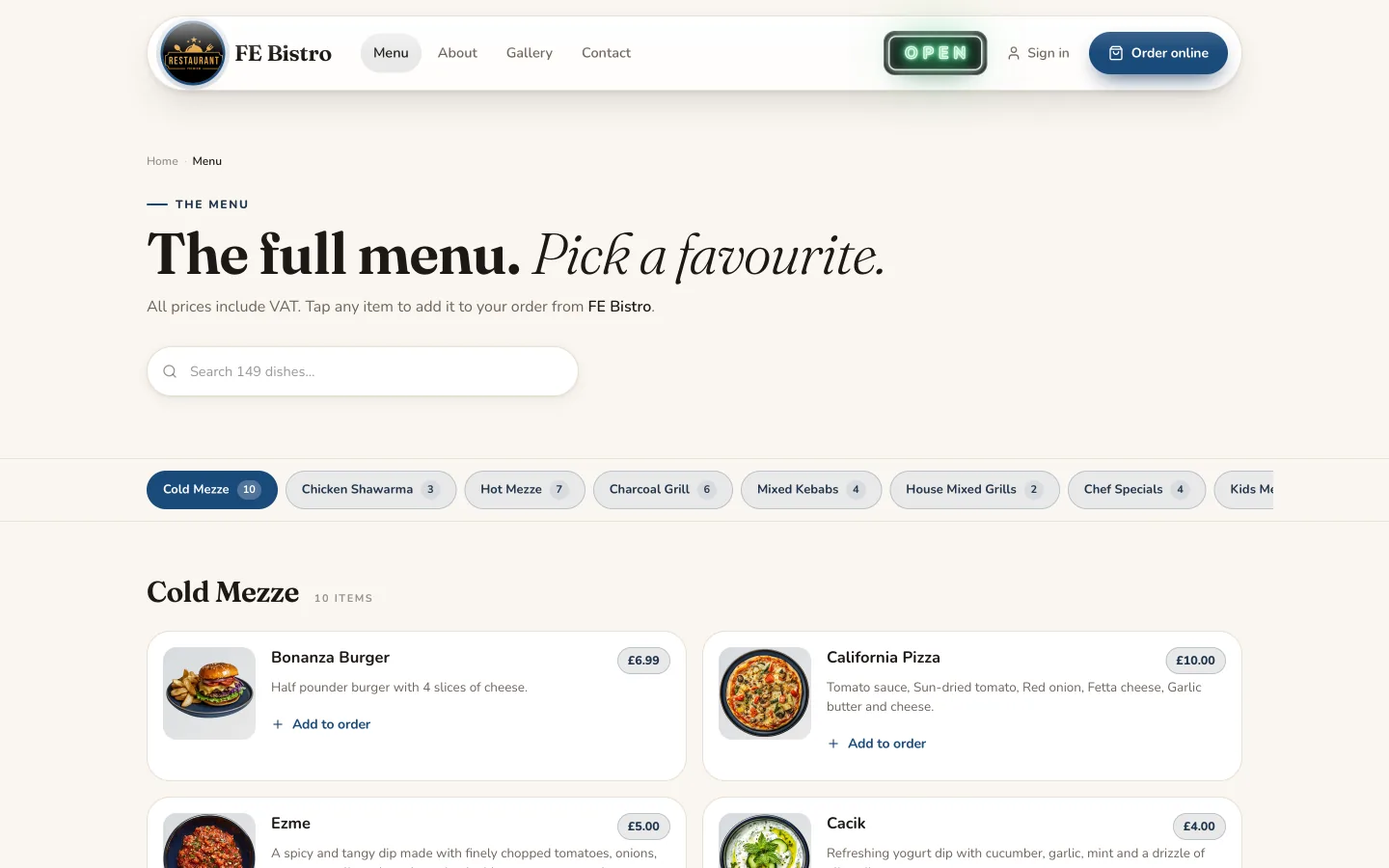
A menu page Google can read

A readable menu for people who just want to look, indexed as a real page with prices and descriptions. Every item links straight into the ordering flow. Restaurant schema gives you rich results.

Real siteIndexed menuRich results
fe-bistro.foodengine.uk/menu
The website's menu page
On a phone

Most of your visitors are on a phone

Every section is mobile-first, with the order button within thumb reach. Your Instagram bio, your Google Business Profile and your printed QR all land here, or straight on the ordering page if you prefer.

Real siteMobile-firstOne tap to order
The restaurant website on a phone
The editor

Edit your site like a settings page

Pick a brand colour or paste your own hex, choose a font pairing, drag sections into the order you want, preview, publish. Changes are live in seconds. No designer, no agency, no waiting.

Real page20 palettes8 font pairingsLive preview
dashboard.foodengine.uk/website
The website editor inside the dashboard
06 · Order channels

One link, everywhere you already are

The ordering page is a standalone store. Drop the link anywhere and it just works: no app for the customer, no marketplace in between.

Instagram · TikTok

The link in the bio

Behind every story sticker and under every clip. When a video takes off, the profile tap goes straight to your menu.

Google

Business Profile order button

Add your link to your profile and “Order online” points at you, not at an aggregator taking a cut

WhatsApp · Messenger

Send the menu, take the order

Drop the link into any chat, group or auto-reply. No phone tennis, no misheard toppings.

Print

QR on every box, flyer and table

PNG and SVG from the dashboard. Table QRs carry the table number onto the ticket.

Your existing site

One line of embed

Already have a website? Paste the embed script and the store appears inside it, same basket, same checkout

Food halls

One QR, every kitchen

Guests browse every kitchen from one QR, and each kitchen is paid direct to its own Stripe account. Each tablet sees only its own orders.

Share kit

Everything you need to hand out the link

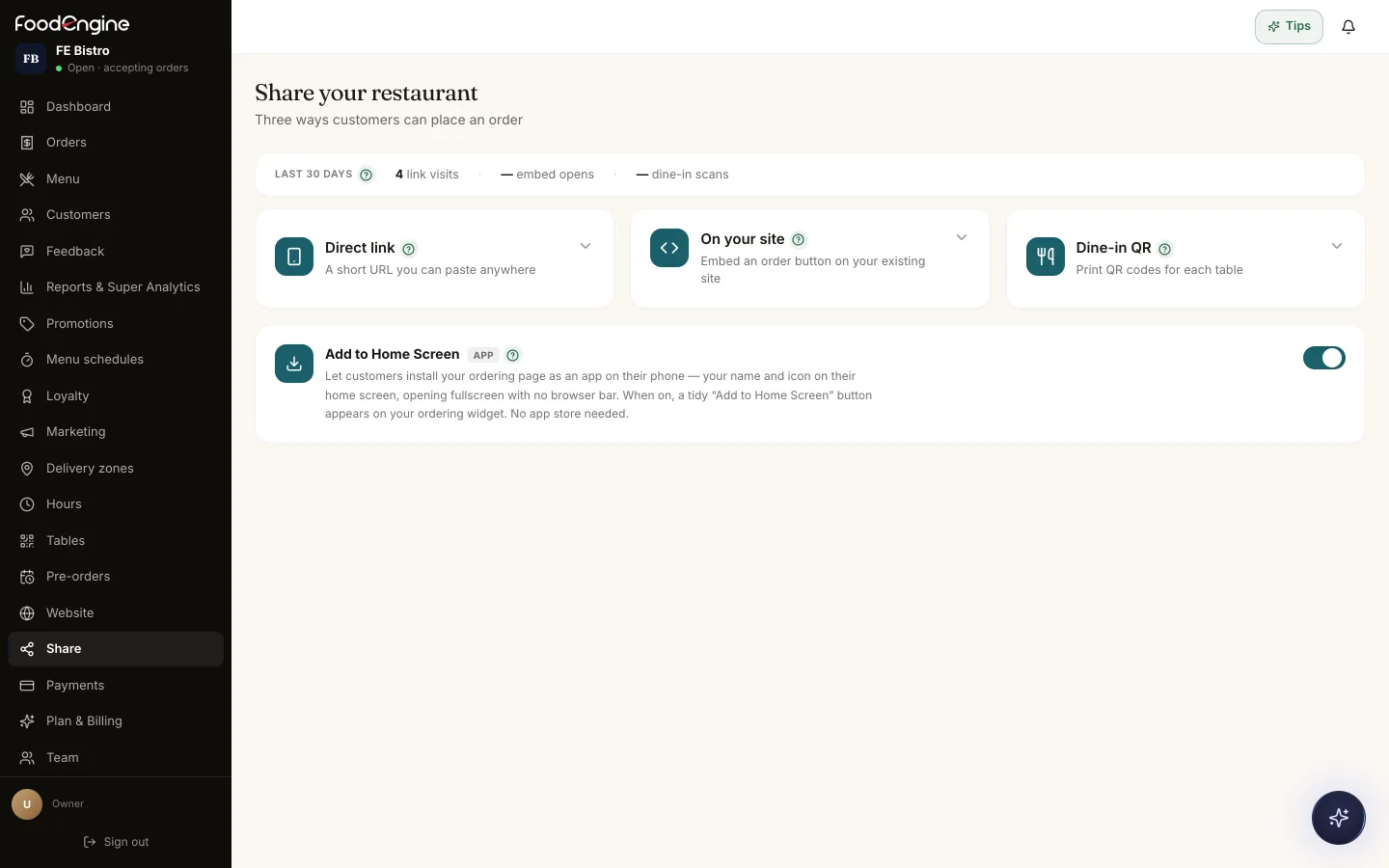
Your short link, QR codes as PNG and SVG, a table-QR print sheet and the embed snippet. Switching from GloriaFood? Send us the link and we import your menu, free, usually the same day.

Real pageShort linkQR PNG + SVGEmbed script
dashboard.foodengine.uk/embed
The Share page with the ordering link, QR codes and the embed script
07 · Food halls and multi-kitchen venues

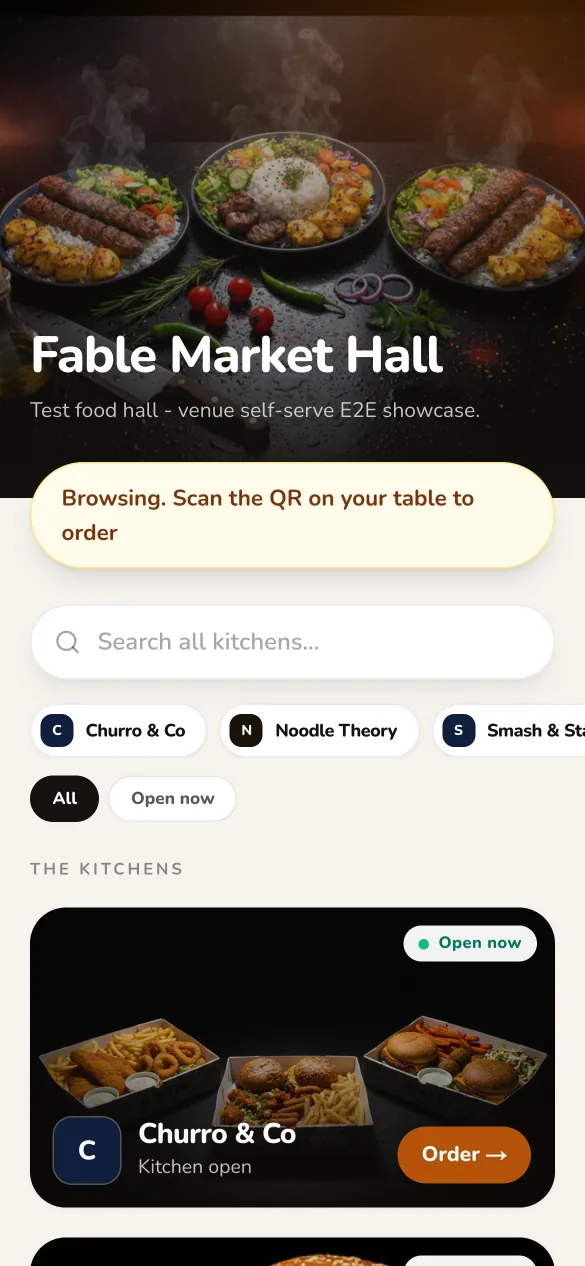
One QR, every kitchen in the hall

Northern market halls, food courts, event seating. The guest scans once and browses every kitchen. Each kitchen is paid direct to its own Stripe account, each tablet sees only its own tickets, and the same table number prints on every one of them.

  • Per-kitchen tickets and payouts
  • Search dishes across all kitchens at once
  • A venue dashboard for the hall, a normal dashboard for each kitchen
A food hall's ordering page on a phone listing every kitchen
One kitchen's menu inside the food hall
08 · One platform, not five subscriptions

Everything a restaurant needs online, in one stack

Most restaurants pay a marketplace, a website builder, a booking tool, an email tool and a POS add-on. FoodEngine replaces the lot with one login and one price. Seven layers, each one a real part of the product, shown on its own screen. Pick a layer, search for a feature, or follow one order through the whole stack.

Tap a layer, or move the pointer to tilt the stack
Engie & intelligence
L7 · Engie & intelligence

Run the restaurant by asking, see the week before your accountant does

Every plan

Engie lives inside the dashboard and acts on your word: reprice an item, pause delivery, hide a sold-out dish, with a confirmation before anything changes. Underneath, reports by hour, item and channel, and monitoring that notices a silent kitchen.

Engie AI copilotAsk in plain English, inside the dashboard
Price and menu changes on your word"Lamb shish up 50p" becomes a confirmed change
Pause delivery or collection"Pause delivery for an hour" pauses it
Questions about your numbers"How did Saturday compare?" answered from real data
Reports by hour, item and channelWhere the money comes from, and when
Repeat-customer rateHow many come back, and how fast
Export for your accountantEverything they ask for, in a spreadsheet
Kitchen-offline and printer alertsWe notice a silent tablet before you do
Round-the-clock monitoringEvery restaurant watched, day and night
✓Engie proposes the change and shows the difference. Nothing is applied until you confirm.

The maths, in your numbers

A marketplace takes a percentage of every order. FoodEngine is a flat monthly price, and every plan carries 0% commission. Move the slider to your online sales and type the rate you are charged today.

%
Plan
Commission a month£600at 15% of your sales
FoodEngine a month£40flat, 0% per order
Kept in your pocket£560 a month · £6,720 a yearFlat beats 15% commission once online sales pass £267 a month

Example rate. Marketplaces charge different percentages and fees; type the one on your statement. Stripe's processing fee (1.5% + 20p on UK cards) is not included here.

Marketplace commissionWebsite builderQR menu appLoyalty appEmail toolKitchen display add-onAnalytics add-onDomain and SSL
One login, one priceFrom £40.00 a month, 0% commission on every order, 14-day free trial with no card
09 · Pricing

One flat subscription, zero marketplace fees

Marketplaces take 15 to 30% of every order. FoodEngine takes £0. Stripe's processing fee (1.5% + 20p for UK cards) is the only per-order cost, and it goes to Stripe, not to us.

Starter

Replace GloriaFood + own your customers.

£40/month

0% marketplace fees · paid to your bank

Start free trial
  • Unlimited orders: zero marketplace fees
  • Branded ordering widget
  • Direct URL + embed script
  • Marketing website + CMS
  • Custom domain and free SSL
  • Menu, categories and modifiers
  • Orders dashboard with real-time push
  • Stripe Connect: zero marketplace fees
  • Delivery zones + postcode checker
  • Pre-orders + scheduling
  • Dine-in QR codes
  • Basic promotions
  • Reports & Super Analytics
  • Engie AI assistant
  • AI photo studio (3 welcome credits)
  • Email and chat support
Most popularGrowth

Drive more orders, look more pro.

6-month offer
£60£50/month

£50/mo for 6 months, then £60

0% marketplace fees · paid to your bank

Start free trial
  • Everything in Starter, plus
  • Loyalty stamps, points + vouchers
  • Advanced promotions: all 13 deal types
  • 3 or more thermal printers / kitchen stations
  • Email campaigns (5,000/mo)
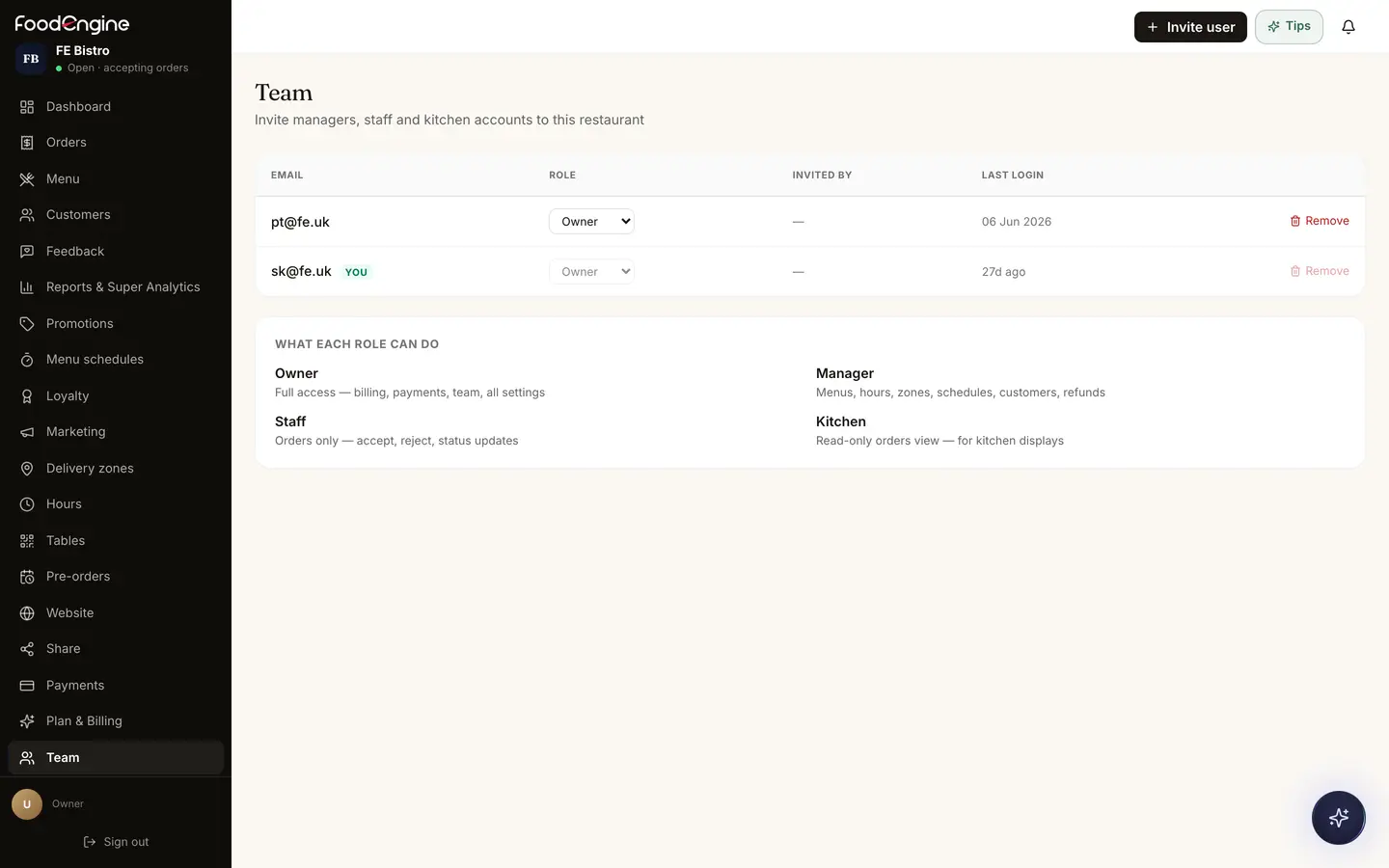
  • Up to 5 staff users
Pro

Bigger teams, bigger campaigns.

£80/month

0% marketplace fees · paid to your bank

Start free trial
  • Everything in Growth, plus
  • Email campaigns (15,000/mo)
  • Unlimited staff users
  • Priority support

All plans: 14-day free trial, no card to start · no marketplace fees ever · Stripe processing only (1.5% + 20p, UK cards) · cancel anytime. Full comparison on the pricing page.

10 · How it works

Live before Friday

Most restaurants are taking orders the same afternoon. If you are moving from GloriaFood, we do the menu for you.

STEP 01

Create your account

Enter your restaurant name and address. Pick your plan. Fourteen days free, no card.

STEP 02

Add your menu

Add your categories, items and photos, or paste your existing menu and we import it. Set opening hours and delivery zones.

STEP 03

Share your link

Your ordering page is live at yourrestaurant.foodengine.uk. Put it on your socials, your Google listing, your receipts. Install the kitchen app. Done.

FAQ

Common questions about online ordering

Can't find what you are looking for? Drop us a line from the contact page.

Do my customers need to install an app?
No. Your ordering page is a normal web page that works in any browser, and customers can add it to their home screen as an icon if they order often. Apple Pay and Google Pay work straight from the browser.
Do I need a website to use FoodEngine?
No. Every plan includes a free ordering page at yourname.foodengine.uk. Customers can order from that link directly. You can connect your own domain on any plan. No existing website needed.
How are payments handled?
Payments go directly to your Stripe account via Stripe Connect. We never hold your money. Customers' card charges land straight in your account, with payouts to your bank typically within 1 to 3 working days on Stripe's standard schedule. Stripe's standard fee (1.5% + 20p for UK cards) applies, but there's no FoodEngine commission on top.
What hardware do I need?
We recommend the GoodCom all-in-one: a kitchen tablet with a thermal printer built in, which we supply for £200 including VAT. It is the device our live restaurants use, and it runs the free FoodEngine Kitchen app. It is optional: the app also runs on any Android tablet (we recommend a 10-inch model, around £80-100) with an 80mm ESC/POS thermal printer, either on your WiFi or network (port 9100) or paired to the tablet over Bluetooth. We have tested with the Epson TM-T88VI, and Star printers work in ESC/POS mode. USB-only printers and cash drawers are not supported yet. No locked-in kit.
Can I migrate from GloriaFood?
Yes, and we'll do the move for you, free. Send us a link to your current ordering page (or your menu in any format) and we'll import your categories, items, sizes, options and prices, usually same-day. You add your photos when you're ready.
Can I use FoodEngine alongside Deliveroo or Just Eat?
Absolutely. FoodEngine runs independently of the aggregators. Many of our customers start by running both, then gradually shift more orders to their direct channel as customers discover the shorter wait times and better prices.
Can I keep my existing domain?
Yes, on any plan. You point your domain's DNS to us and we handle SSL via Cloudflare. The changeover takes about 10 minutes and customers won't notice any downtime.
Is my data my own?
Yes, completely. You own every order record, every customer record, and every menu item. We provide a full CSV export at any time from the dashboard. If you cancel, we keep your data accessible for 90 days then delete it, or export it all first.
Start today

Your restaurant, your customers, your orders

Fourteen days free, no card to start. If you are moving from GloriaFood, send us your link and we will have your menu in before you finish your coffee.

No marketplace fees, no contracts, no nonsense